
HTTP and HTTPS look like tiny variations in a URL, but they change how data moves and how safe your website is. This guide breaks down what each protocol does, the technical differences, real-world implications for users and site owners, SEO effects, and exactly how to switch a site to HTTPS without breaking things.
What is HTTP?
HTTP (Hypertext Transfer Protocol) is the basic language browsers and web servers use to exchange pages, images, forms and other resources. It’s a request-response protocol: the browser asks for a resource, the server sends it back.
How HTTP works — simple flow
- Browser creates an HTTP request (GET, POST, etc.).
- The request travels over the network to the server.
- Server processes the request and returns a response (status code + payload).
- Browser renders the response.
What this really means is: HTTP is straightforward and fast, but it sends data in plain text. That’s fine for public pages where no sensitive data moves, but risky for anything private.
What is HTTPS?
HTTPS is HTTP layered over TLS (Transport Layer Security). TLS encrypts the data between browser and server, ensuring confidentiality, integrity and—when paired with a valid certificate authenticity of the server.
Key additions HTTPS brings
- Encryption: prevents eavesdropping.
- Integrity: detects if data was tampered with.
- Authentication: proves the server is who it claims to be (via TLS certificates).
Let’s break it down: HTTPS doesn’t replace HTTP; it secures it. The “S” is the security layer that protects users and sites from common network threats.
Technical differences (side-by-side)
Security and encryption
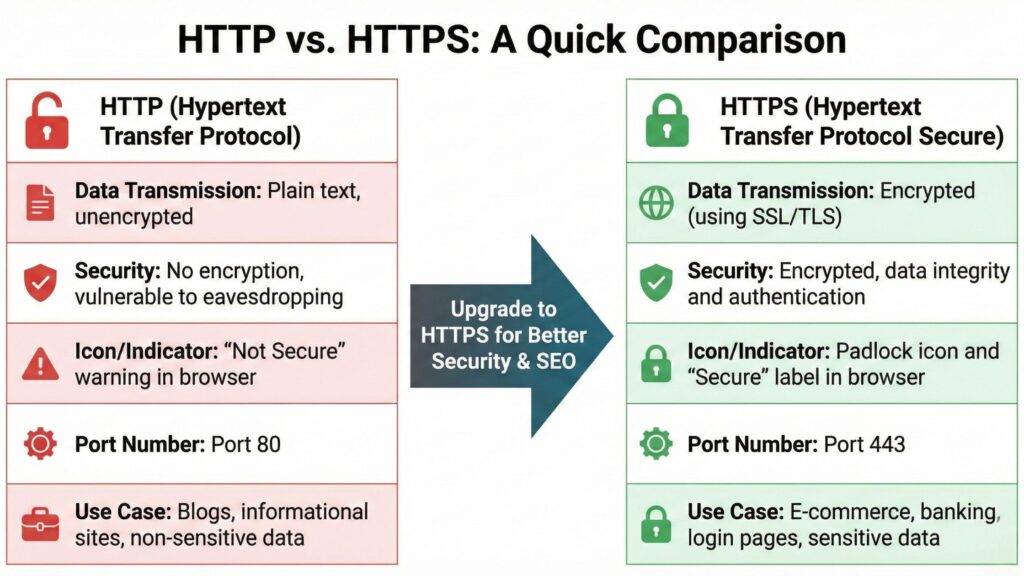
- HTTP: Data is plain text. Any on-path actor can read or modify traffic.
- HTTPS: Data encrypted with symmetric keys negotiated via TLS. Eavesdroppers can’t read or change content without breaking the cryptography.
Ports
- HTTP typically uses TCP port 80.
- HTTPS typically uses TCP port 443.
Performance
- Old myth: HTTPS is slower. Not true today. TLS handshake adds a small overhead, but modern improvements (TLS 1.3, HTTP/2, connection reuse) often make HTTPS equal or faster in practice because of multiplexing and compression features on secure connections.
Caching and intermediaries
- HTTP permits more transparent caching by intermediaries (CDNs, proxies) without strict controls.
- HTTPS restricts intermediate tampering and forces caching to be explicit (via cache headers). CDNs still cache, but they terminate TLS and act as configured trusted endpoints.
URL and browser UI
- HTTP URLs start with http:// and may display “Not secure” in modern browsers if input fields are present.
- HTTPS URLs start with https:// and show a padlock icon (or equivalent). That padlock signals encryption and a verified certificate, improving user trust.
How HTTPS actually works — TLS handshake (high level)

- Client Hello: Browser proposes TLS version and cipher suites.
- Server Hello: Server picks parameters and sends its TLS certificate (contains public key).
- Certificate validation: Browser checks certificate chain, expiry, and issuer trust.
- Key exchange: Client and server establish shared symmetric keys (using asymmetric crypto).
- Secure channel established: All subsequent HTTP data is encrypted.
Now the important part: certificate validation is what ties the server identity to the encryption. If the cert is invalid or misconfigured, browsers will warn users and block access to sensitive pages.
Why HTTPS matters — beyond encryption
User trust and conversions
A padlock reduces friction. Users are more likely to trust payment pages, login forms, sign-ups and any page that asks for personal data. That trust converts directly into fewer drop-offs.
Data integrity
With HTTPS you prevent content injection by ISPs, public Wi-Fi malware, or compromised routers. That means your JavaScript, tracking pixels, and UX stay intact.
Compliance and privacy
Many regulations and standards expect encryption in transit (PCI-DSS, GDPR best practices). HTTPS is often a baseline requirement for compliance.
SEO and ranking signals
Google uses HTTPS as a lightweight ranking signal. But more importantly, switching to HTTPS prevents mixed-content issues and avoids browser security warnings that kill user engagement — which indirectly influences rankings.
SEO implications (practical, not theoretical)
HTTPS alone won’t boost you to the top. But:
- Google confirmed HTTPS as a ranking signal. It’s modest, but present.
- Migration to HTTPS must be clean: improper redirects, duplicate content (HTTP + HTTPS), broken canonical tags, or mixed content can cause temporary ranking drops.
- HTTPS improves user experience by eliminating security warnings, reducing bounce rate, and protecting analytics/tracking fidelity (no injection or loss of data).
Actionable SEO checklist for migration:
- Use 301 redirects from every HTTP URL to HTTPS equivalent.
- Update canonical tags, sitemap, hreflang and internal links to HTTPS.
- Ensure HSTS (HTTP Strict Transport Security) is configured after a successful rollout.
- Monitor Google Search Console for any coverage/URL indexing issues.
- Keep both HTTP and HTTPS property in Search Console initially to monitor traffic, then focus on HTTPS.
Real-world examples and scenarios
Example 1: Login form on HTTP
A login form over HTTP exposes credentials in plain text. On public Wi-Fi, a man-in-the-middle can capture the password.
Example 2: Analytics and content integrity
If a site uses HTTP, injected scripts by ISPs can modify content or produce false analytics events. HTTPS prevents that.
Example 3: Mixed content problem
If your main page is HTTPS but some images, scripts or fonts load over HTTP, browsers block or warn. That breaks layout or functionality and reduces trust.
How to migrate a site from HTTP to HTTPS (step-by-step)
Choose the right certificate:
- For most sites: a standard DV (Domain Validation) certificate is fine.
- For multiple subdomains: use a wildcard cert.
- For many domains: use a multi-domain (SAN) certificate.
- For high-assurance needs: EV certs exist but bring little SEO benefit compared with proper setup.
Obtain and install the certificate:
- Use a trusted CA (Let’s Encrypt for free, or paid CAs for extended support).
- Install on web servers, load balancers, or CDN edge servers.
Enable and test TLS:
- Prefer TLS 1.2+; enable TLS 1.3 where possible.
- Disable old, insecure ciphers and SSLv3.
Update server configuration:
- Redirect all HTTP (port 80) traffic to HTTPS (301 permanent).
- Configure HSTS with appropriate max-age only after testing. Start with a short duration, then increase. Consider the preload list only when fully confident.
Update site assets and links:
- Change internal links, canonical tags, sitemaps, robots.txt references to HTTPS.
- Update third-party resources if they are available over HTTPS.
Update services:
- Update CDN origin settings and SSL termination.
- Update Search Console, Analytics, tag managers, and any API endpoints.
- Inform external partners (if they link to HTTP).
Test thoroughly:
- Use tools like SSL Labs (for full report), browser devtools (for mixed content), and Search Console for indexing.
- Crawl the site to find HTTP references and broken links.
Monitor after launch:
- Watch organic traffic, crawl errors, and security reports.
- Keep an eye on conversion funnels — any sudden drops are a red flag.
Common pitfalls and how to avoid them
- Incomplete redirects: Missing 301s from some HTTP URLs leads to duplicate content. Solution: full-site redirect rules and comprehensive crawl.
- Mixed content: Some assets still load over HTTP → browser warnings or blocks. Solution: update all assets and third-party resources.
- Certificate misconfiguration: Wrong hostname, expired cert, or intermediate chain errors. Solution: validate chain, expiry, and SAN coverage before switching.
- HSTS missteps: Enabling aggressive HSTS and then losing control of the domain can lock users out. Solution: roll HSTS gradually and only add to preload after testing.
- Ignoring backlinks: Links pointing to HTTP will still work but are redirected. Monitor backlinks in case high-value referrers have issues.
Testing and verification (tools and checks)
- Browser address bar: padlock, no warnings.
- Developer console: check for mixed content warnings.
- SSL Labs test: overall server grade and handshake details.
- curl and openssl: verify TLS versions and certificates from the command line.
- Site crawl (Screaming Frog, Sitebulb): find HTTP URLs, mixed content, and redirect chains.
- Google Search Console: indexing, coverage, and any security messages.
When HTTPS isn’t enough
HTTPS protects data in transit. It doesn’t:
- Secure your server or application vulnerabilities (use Web Application Firewalls, patching).
- Prevent account takeover if passwords are weak or leaked.
- Replace correct authentication, authorization, or input validation practices.
Security is layered. HTTPS is a crucial layer but not the only one.
Conclusion
Switching from HTTP to HTTPS is non-negotiable for modern sites. What this really means is: HTTPS protects users, preserves content integrity, improves trust, and avoids browser warnings that kill conversions. It also aligns with SEO best practices. The migration isn’t magic it’s a set of careful, technical steps: pick the right certificate, configure TLS properly, perform site-wide 301s, fix mixed content, update all references, and monitor closely. Do the work methodically and you’ll lock in better security, cleaner analytics, and a smoother user experience all of which pay off in rankings and revenue
FAQS about Difference between HTTP and HTTPS
Q: Is HTTPS required for SEO?
A: Strictly speaking, no single factor is “required.” However, HTTPS is a confirmed ranking signal and a practical necessity for user trust and data protection. Sites without HTTPS risk browser warnings that hurt engagement and conversions, which indirectly harms rankings.
Q: Will switching to HTTPS hurt my Google rankings?
A: If done poorly, yes — temporary drops can happen from incorrect redirects, mixed content, or duplicate content. If you follow a clean migration (301 redirects, update canonicals, update sitemaps, test), any short-term fluctuations usually stabilize or improve.
Q: Do I need a paid SSL certificate or is Let’s Encrypt fine?
A: Let’s Encrypt is a reliable, free option suitable for most sites. Paid certs can offer warranties, extended support, or convenience features, but they do not inherently improve SEO or encryption strength compared with a properly configured Let’s Encrypt certificate.
Q: What is mixed content and why is it a problem?
A: Mixed content happens when an HTTPS page loads assets (images, scripts, CSS) over HTTP. Browsers may block or warn about these resources, breaking functionality and undermining trust. Fix by ensuring all assets are requested via HTTPS or relative/protocol-agnostic URLs.
Q: What is HSTS and should I enable it?
A: HSTS (HTTP Strict Transport Security) tells browsers to always use HTTPS for your domain. It prevents downgrade attacks but must be used carefully. Start with a short max-age, test thoroughly, then increase. Only submit to the preload list when you’re completely ready.
Q: How long before my HTTPS pages are indexed by Google?
A: Google typically re-crawls and re-indexes quickly if redirects are correct. The timeline depends on crawl budget and site size. For most small-to-medium sites, changes appear within days to a few weeks. Monitor Search Console for progress.
Q: Should I keep the HTTP property in Google Search Console after migration?
A: Keep it temporarily to monitor traffic and errors, but your primary focus should be the HTTPS property. Over time, you can remove the HTTP property once everything is stable.

I’m Shivam Panchal, an SEO expert and digital marketer from Delhi. I run SEO Shades, where I share practical SEO tips, link-building strategies, and website growth hacks. With over 5 years of experience, I help businesses boost their online visibility and rank higher on Google.
