
How Google Search Works: Crawling, Indexing and Ranking Explained

Written by Shivam Panchal
Founder & SEO Consultant, SEO Shades
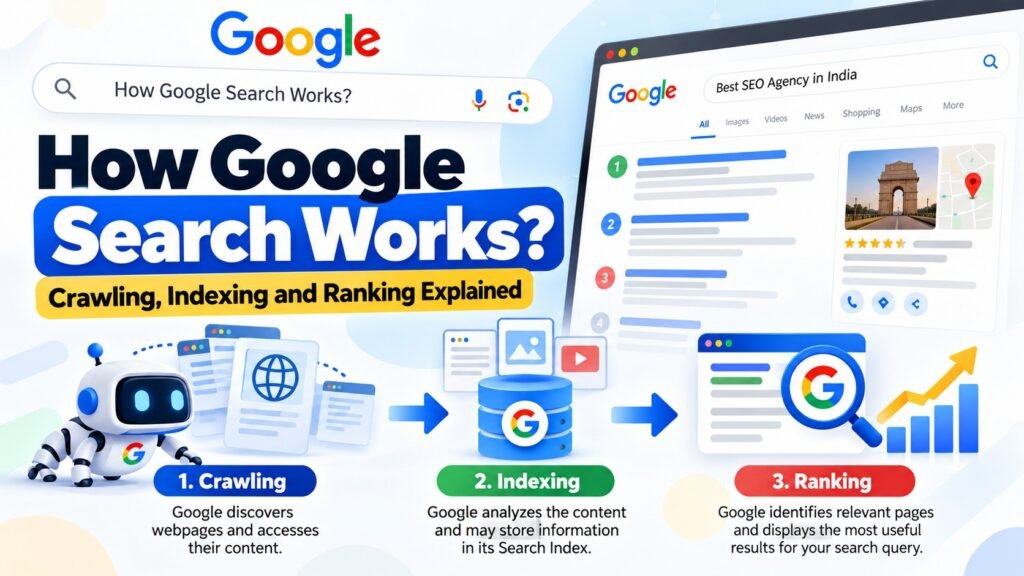
Have you ever wondered how Google can display thousands or even millions of relevant websites within seconds after you enter a search query?
For example, when you search for Best SEO Agency in India, Google immediately displays a list of websites offering SEO services. Some websites appear at the top, while others are pushed further down the search results.
But how does Google know which websites are relevant to your search? How does it understand what a particular webpage is about? More importantly, how does it decide which page deserves the first position?
Does Google scan the entire internet every time someone performs a search?
No. That’s not how Google Search works.
Google has already discovered and processed a huge number of webpages before you perform a search. It continuously discovers new URLs, crawls webpages, analyzes their content, and stores information about eligible pages in its Search Index.
When someone enters a search query, Google retrieves relevant information from this existing index and uses its ranking systems to determine which results are most useful.
The entire process can be divided into three main stages:
- Crawling: Google discovers webpages and accesses their content.
- Indexing: Google analyzes the content and may store information about the page in its Search Index.
- Serving Search Results: Google identifies relevant pages and displays them in response to a user’s search query.
Understanding these three stages is essential for anyone working in SEO. If you don’t understand how Google discovers, processes, and ranks your website, diagnosing technical SEO problems becomes much harder.
Let’s break down how Google Search works, with practical examples to understand what happens behind the scenes.
What Is Google Search and How Does It Work?
Google is a fully automated search engine that uses automated software programs to discover and process webpages across the internet.
These programs are commonly known as web crawlers. Google’s primary web crawler is called Googlebot.
Googlebot visits websites, accesses webpages, and collects information that Google can process. This information may include text, images, links, HTML elements, and other page resources.
Google then analyzes the collected information and may add the relevant page to its Search Index.
When a user searches for something, Google doesn’t start scanning the entire internet from scratch. Instead, it searches its existing index to identify webpages that are relevant to the query.
Think of Google Search like a library.
Imagine walking into a library with thousands of books. If you want to find a book about SEO, you don’t need to open every book and read its contents.
The library has already organized its books into categories and created an indexing system. You simply explain what you’re looking for, and the library helps you find relevant books.
Google Search works in a similar way, although its actual technology and processes are much more complex.
The three stages work together:
- Crawling helps Google discover webpages.
- Indexing helps Google understand and organize information.
- Ranking and serving help Google display relevant results when someone searches.
Let’s understand each stage in detail.
1. Crawling: How Does Google Discover Your Website?
Crawling is the first stage of Google Search.
Crawling is the process through which Google discovers webpages and fetches their content.
Google uses automated programs called web crawlers or Googlebot to access webpages and collect information.
But here’s an important question: When millions of websites and billions of webpages exist on the internet, how does Google know which new pages have been published?
Google discovers URLs through several different sources.
1.1 URL Discovery: How Does Google Find New Pages?
Before Google can crawl a webpage, it needs to know that the URL exists.
If Google doesn’t know about a particular URL, it cannot directly attempt to crawl that page.
Google discovers URLs through several methods.
Internal Links
Internal links are links that connect one page of your website to another page on the same website.
For example, suppose you already have a blog post about technical SEO. You publish another article covering a technical SEO audit checklist.
If you add a link to the new article from your existing blog post, Google may discover the new URL when it crawls the older page.
Consider this example:
Existing category page:
https://seoshades.co.in/blog/New blog post:
https://seoshades.co.in/blog/technical-seo-guide/If your category page contains a link to the new article, Google can follow that link and discover the new URL.
This is one reason internal linking plays an important role in SEO.
Internal linking helps search engines discover pages and understand the relationships between different sections of your website.
It also helps users navigate your website and find related information.
However, simply adding an internal link doesn’t guarantee that Google will crawl or index the destination page.
External Links
Google can also discover your webpages through external links.
External links are links pointing to your website from other websites.
For example, imagine another SEO blog publishes an article about technical SEO and includes a link to one of your guides on SEO Shades.
When Google crawls that external website, it may discover the URL of your article through the link.
This means external links can contribute to URL discovery.
They can also help Google understand relationships between webpages across the internet.
XML Sitemap
Another important method of URL discovery is an XML Sitemap.
An XML Sitemap is a file that contains a list of URLs you want search engines to know about.
For example, if your website has 500 blog posts, you can include the important URLs in your XML Sitemap.
You can then submit your sitemap through the Sitemaps section of Google Search Console.
This helps Google discover the URLs included in your sitemap.
However, remember one important thing:
Submitting an XML Sitemap does not guarantee that Google will crawl or index every URL.
A sitemap is a discovery aid. Google still decides which URLs to crawl and which pages are suitable for indexing.
Related Post : How to Start SEO for a Website: A Step-by-Step Guide for Beginners
1.2 What Is Googlebot?
Googlebot is Google’s web crawler. Its primary job is to discover and fetch webpages so they can be processed by Google’s Search systems.
You can think of Googlebot as an automated visitor that visits your website and accesses different pages.
However, Googlebot doesn’t necessarily crawl every page of a website in one visit.
Google’s systems determine how frequently a website should be crawled and how many resources should be used during crawling.
Several factors can influence crawling patterns, including:
- Website size.
- How frequently the website is updated.
- The importance and demand for individual URLs.
- Server response speed.
- Website accessibility.
- The ability of the server to handle crawling requests.
For example, consider a news website that publishes hundreds of articles every day.
Google may need to revisit that website frequently to discover newly published articles and updated information.
Now consider a small business website that hasn’t published any new content for several months.
Its crawling patterns may be different because Google has fewer new or updated URLs to discover.
This doesn’t mean publishing more content will automatically force Google to crawl your website more frequently.
Google decides when and how frequently to crawl URLs based on its own systems and available resources.
1.3 What Is Crawl Budget?
Crawl Budget is another important technical SEO concept.
Before understanding Crawl Budget, remember that Google doesn’t have unlimited resources to crawl every webpage on the internet continuously.
There are enormous numbers of URLs across the web. Google therefore needs to determine how many resources it should spend crawling a particular website.
Crawl Budget is broadly related to the number of URLs Googlebot can and wants to crawl on a website.
Two important concepts help explain it.
Crawl Capacity Limit
Crawl Capacity Limit refers to how much crawling a website’s server can handle without becoming overloaded.
For example, suppose Googlebot sends multiple requests to your website, but your server responds very slowly or repeatedly returns 500 Internal Server Errors.
Google may reduce its crawling activity to avoid putting additional pressure on the server.
A technically healthy website with a stable server response can make crawling easier.
Crawl Demand
Crawl Demand refers to how much Google wants to crawl URLs on your website.
Google may have different levels of crawling demand depending on factors such as:
- How important Google considers particular URLs.
- How frequently pages are updated.
- Whether Google has detected changes.
- How popular or relevant certain URLs appear to be.
For example, an important page that receives frequent updates may have different crawling demand from an old page that rarely changes.
Does every website need Crawl Budget optimization?
No.
Crawl Budget is generally more relevant for large websites with thousands or millions of URLs.
For smaller websites, such as a basic business website or a blog with a few hundred pages, Crawl Budget is not usually the first SEO issue you need to worry about.
Instead, focus on making important pages accessible, fixing technical errors, improving internal linking, and avoiding unnecessary URLs.
1.4 Robots.txt: How Does It Control Crawling?
Robots.txt is a text file that website owners use to provide crawling instructions to automated crawlers.
It helps communicate which parts of a website crawlers are allowed or not allowed to access.
For example, if you don’t want Googlebot to crawl a particular directory, you can use a Disallow rule in your Robots.txt file.
A simple example looks like this:
User-agent: Googlebot
Disallow: /private/
This rule tells Googlebot not to crawl URLs under the /private/ directory.
Robots.txt is useful for managing crawler access, but there’s something important you need to understand.
Blocking a URL through Robots.txt does not automatically remove that URL from Google’s Search Index.
If Google discovers a blocked URL through external links or other sources, it may still index the URL without accessing its page content.
This is why Crawling and Indexing must be treated as two separate processes.
Robots.txt controls crawling access. It is not an indexing removal mechanism.
Related Post : Google Crawling vs Indexing: Why Your Pages Aren’t Appearing in Search
1.5 Common Google Crawling Problems
Sometimes Googlebot cannot successfully crawl a webpage.
There can be several reasons behind this problem.
1. Server Errors
If your website repeatedly returns 500 Internal Server Errors, Googlebot may fail to fetch the requested page.
Server errors can interrupt crawling and affect Google’s ability to process your content.
2. Network Issues
DNS problems, network failures, or connectivity issues can prevent Google from accessing your website.
Even if your website works normally for you, Googlebot may experience accessibility problems.
3. Robots.txt Restrictions
You may accidentally block important pages or directories through Robots.txt.
For example, if you disallow an entire blog directory, Googlebot may not be able to crawl your blog posts.
4. Login Restrictions
If a webpage requires users to log in before accessing its content, Googlebot generally cannot access that private information.
This can prevent Google from crawling content that isn’t publicly accessible.
5. Broken Internal Links
Broken links can make it difficult for Google to discover important pages.
Similarly, if a page doesn’t receive internal links from other accessible pages, it may become difficult to discover through normal website navigation.
These problems should be investigated during a technical SEO audit.
You can use Google Search Console’s URL Inspection Tool and Crawl Stats report to investigate URL accessibility and crawling-related issues.
2. Indexing: How Does Google Understand Your Content?
Now imagine Googlebot has successfully visited your website and fetched one of your blog posts.
Does that mean the page will automatically appear in Google Search?
No.
After Crawling comes the second stage: Indexing.
Indexing is the process through which Google analyzes information collected from webpages and may store that information in its Search Index.
In simple terms:
- Crawling means Google accesses your webpage.
- Indexing means Google processes the information and determines whether the page should be included in its Search Index.
These are two different activities.
Let’s understand how Google processes webpage information.
2.1 How Does Google Analyze Page Content?
When Google processes a webpage, it doesn’t just look at the visible text.
It can analyze several elements to understand what the page is about.
Some important elements include:
- Main content.
- Page title.
- Meta information.
- Headings.
- Images.
- Image Alt Text.
- Videos.
- Internal links.
- Structured data.
- Other HTML elements.
For example, suppose you publish an article on SEO Shades titled:
What Is Technical SEO?
Google can analyze the page title, headings, main content, links, and other available information to understand its subject.
If your article provides useful information about technical SEO, Google can use that information to understand the page’s topic.
However, Google doesn’t rely on a single keyword or title to understand a webpage.
It attempts to understand the overall context and meaning of the content.
This is why writing naturally and covering a topic properly is more useful than simply repeating the same keyword throughout an article.
Related Post : How to Fix Discovered – Currently Not Indexed in Google Search Console
2.2 Importance of Title Tags and Headings
Title Tags are important HTML elements that help describe the subject of a webpage.
For example:
<title>What Is Technical SEO? Complete Guide</title>This title gives users and search engines an idea of what the page covers.
Similarly, headings such as H1, H2, and H3 help organize content into logical sections.
Suppose you’re publishing an article about Technical SEO.
A well-organized structure might look like this:
H1: What Is Technical SEO?

H2: Why Is Technical SEO Important?

H2: Technical SEO Checklist

H3: Website Speed Optimization

H3: XML Sitemap Optimization

H3: Robots.txt Optimization
This structure makes the content easier to navigate and understand.
It also helps readers quickly find the information they’re looking for.
However, using the correct heading structure doesn’t guarantee indexing.
Google considers multiple aspects of a webpage, including its content, accessibility, and overall usefulness.
Your objective should be to organize information logically rather than adding headings just to include more keywords.
2.3 How Does Google Handle Images and Videos?
Google doesn’t process only text-based content.
It can also process images and videos using available information and different signals.
For example, when Google analyzes an image on your webpage, it may use information such as:
- Image file content.
- Alt Text.
- Image filename.
- Surrounding text.
- Context of the webpage.
This is why optimizing images is an important part of on-page SEO.
Consider these two image filenames:
image001.jpgtechnical-seo-audit-checklist.jpgThe second filename is more descriptive and provides useful context about the image.
You should also write meaningful Alt Text that accurately describes what an image shows.
For example:
<img
  src="technical-seo-audit-checklist.jpg"
  alt="Technical SEO audit checklist showing important website optimization tasks"
>
Avoid stuffing keywords into Alt Text. Its primary purpose is to describe the image accurately.
Videos can also be processed using available video information, metadata, and other signals.
If you publish video content, providing relevant information about the video can help search engines understand what it contains.
2.4 What Is a Canonical URL?
Canonical URLs are an important concept in technical SEO, especially for websites with duplicate or very similar pages.
Imagine your website has multiple URLs displaying similar product content.
For example:
example.com/product/shoes

example.com/product/shoes?color=black

example.com/product/shoes?sort=price
These URLs may contain substantially similar content, even though their URL structures are different.
In this situation, Google needs to determine which version should be treated as the representative version of the page.
Google can group similar pages together through a process known as duplicate clustering.
It may then select one URL from the group as the canonical URL.
A canonical URL is the preferred or representative version of a webpage that Google may choose to display in search results.
Website owners can provide their preferred canonical URL through the rel="canonical" HTML tag.
For example:
<link
  rel="canonical"
  href="https://example.com/product/shoes/"
>
This tells search engines which URL you prefer to be treated as the canonical version.
However, remember that Google’s selection is not guaranteed to match your preference.
Google treats your canonical tag as a signal and may consider other signals before selecting its preferred canonical URL.
For this reason, always ensure that your canonical tags point to the correct pages.
Incorrect canonical implementation can create indexing problems, particularly on ecommerce websites with product variations, filters, and URL parameters.
2.5 Why Are Some Pages Not Indexed by Google?
One of the most common questions SEO professionals face is:
If Google has crawled my page, why isn’t it indexed?
There are several possible reasons.
Let’s look at some common situations.
1. Low-Quality or Thin Content
If your webpage contains very little useful information or doesn’t provide meaningful value to users, Google may decide not to include it in its Search Index.
For example, imagine publishing an article titled “Best SEO Tools” that only contains a list of five tool names without explaining their features, uses, or benefits.
Such a page may not provide enough useful information compared with other available resources.
Focus on creating content that genuinely answers the user’s question.
2. Duplicate Content
If your website contains multiple pages with substantially similar content, Google may select another URL as the canonical version.
As a result, your preferred URL may not appear separately in search results.
This is particularly common on ecommerce websites where product filters and URL parameters generate multiple versions of similar pages.
3. Noindex Tag
A Noindex tag tells search engines not to include a page in their search results.
For example:
<meta name="robots" content="noindex">If Google successfully crawls a page containing this directive, it can process the instruction and exclude the page from its Search Index.
During technical SEO audits, always check whether important pages have been accidentally marked as Noindex.
4. JavaScript Rendering Issues
Some websites depend heavily on JavaScript to load important content.
If essential content is generated through JavaScript and rendering doesn’t work correctly, Google may have difficulty accessing or understanding that content.
For example, if your main article content only becomes available after a JavaScript process that fails during rendering, Google may not be able to process the page as expected.
This is why JavaScript rendering should be checked when auditing JavaScript-heavy websites.
5. Page Accessibility Problems
If Googlebot repeatedly encounters server errors or cannot fetch the webpage properly, indexing may be affected.
A page needs to be accessible for Google to process its content successfully.
The important thing to remember is that successfully crawling a webpage does not guarantee indexing.
Similarly, getting a page indexed doesn’t guarantee that it will receive good search rankings.
3. Serving Search Results: How Does Google Rank Websites?
Now we come to the third and final stage: Serving Search Results.
This is where Google’s ranking systems determine which indexed pages are most relevant and useful for a particular search query.
Imagine someone searches for:
Best SEO Tools
What happens next?
First, Google attempts to understand the user’s search query.
It then identifies potentially relevant pages from its Search Index.
After that, Google’s ranking systems evaluate different signals to determine which results may be the most useful for that particular search.
Finally, Google displays the results on the Search Engine Results Page, commonly known as the SERP.
Let’s understand the factors involved in this process.
3.1 How Does Google Understand Search Queries?
Google doesn’t simply match the exact words entered by a user with keywords appearing on webpages.
It also attempts to understand the meaning and intent behind a search query.
This is commonly known as Search Intent.
For example, consider these three searches:
Search 1: What Is SEO?
Here, the user wants to learn about SEO.
The intent is informational.
Google may display educational articles, guides, and explanatory resources.
Search 2: Buy SEO Course
Here, the user is looking for a course to purchase or enroll in.
The intent is commercial or transactional.
Google may display course pages and other relevant offerings.
Search 3: SEO Agency Near Me
In this case, the user wants to find an SEO service provider in their local area.
Google may display local business listings and other location-relevant results.
This is why checking search volume alone isn’t enough when conducting keyword research.
You also need to understand what users expect to find when they search for a particular keyword.
If you target an informational keyword with a service page, your content may not match the intent behind the query.
Similarly, publishing a general informational article when users are looking for a product or service may not produce the results you expect.
Always analyze the search results before deciding what type of content to create.
Related Post : How to Optimize Content for Google AI Overviews in 2026
3.2 How Does Google Determine Content Relevance?
Once Google understands a search query, it needs to identify which pages are relevant to that query.
Google uses multiple ranking systems and signals to evaluate webpages.
Some important concepts include the following.
1. Meaning of the Search Query
Google attempts to understand what the user actually wants to know.
Sometimes users make spelling mistakes, use incomplete sentences, or search using only a few words.
Even then, Google tries to interpret the intended meaning of the query.
For example, a user searching for “best seo tools begginers” may still be looking for SEO tools suitable for beginners.
Understanding the meaning of a query helps Google return relevant results even when the search isn’t perfectly written.
2. Content Relevance
Google evaluates how closely a webpage relates to the user’s search query.
For example, if someone searches for “Technical SEO Checklist”, a page containing a practical technical SEO checklist may be more relevant than a general article explaining the history of SEO.
Your content should directly address the topic and provide the information users are looking for.
This doesn’t mean you should repeat the exact keyword multiple times.
The overall subject, context, and usefulness of the content matter.
3. Content Quality
Content quality is another important consideration.
Google aims to show content that is helpful, reliable, and useful to users.
Simply adding keywords to a webpage doesn’t make it high-quality content.
Your article should contain accurate information, meaningful explanations, and practical solutions to the user’s problem.
For example, if you’re writing about a technical SEO audit, don’t just mention Robots.txt, XML Sitemaps, canonical tags, and internal linking.
Explain what each element does, why it matters, and how someone can check it on their website.
Practical explanations make content more useful.
4. Page Usability
A webpage should be accessible and easy to use.
Consider factors such as:
- Mobile usability.
- Page loading performance.
- Clear navigation.
- Readable content.
- Overall page functionality.
Page Experience-related signals can also play a role in Google’s Search systems.
However, having a technically perfect website doesn’t automatically guarantee high rankings.
Usability should support the overall quality of the page rather than being treated as a shortcut to ranking.
5. Links and Prominence
Links help Google understand relationships between different webpages.
For example, if relevant and trustworthy websites link to one of your articles, those links can provide signals about the page’s prominence.
This is one reason backlinks remain an important part of SEO.
However, there’s a common misunderstanding that the website with the highest number of backlinks will always rank first.
That’s not how Google Search works.
Google considers multiple signals, and backlink quantity alone doesn’t determine rankings.
The relevance, context, and quality of links also matter.
6. Freshness of Content
Some search queries require updated information.
For example:
Latest Google Algorithm Update
A user searching for this information is likely looking for recent developments.
Therefore, recently updated and relevant information may be more useful.
However, freshness isn’t equally important for every search query.
Consider a historical topic. An article explaining an event from several decades ago doesn’t necessarily need to be updated every month.
The importance of freshness depends on the type of information users are searching for.
3.3 How Do Location, Language, and Device Affect Search Results?
Google Search Results aren’t always identical for every user.
Google may consider factors such as location, language, and device when determining which results are useful.
For example, imagine someone searches for:
Bicycle Repair Shop
If the search is performed from Delhi, Google may show bicycle repair businesses located in or around Delhi.
If someone performs the same search from London, the results may be completely different.
Language also makes a difference.
A person searching in Hindi may receive different results from someone searching for the same topic in English.
Similarly, the context of a search can influence the results displayed.
This is particularly important for Local SEO.
If you run a local business, optimizing your website only for general keywords may not be enough.
You also need to understand how users search for services in specific locations.
3.4 What Appears on Google’s Search Engine Results Page?
Google doesn’t display the same type of search results for every query.
Depending on what someone searches for, the SERP may contain different features.
Some common Google SERP features include:
- Organic Search Results.
- Sponsored Ads.
- Featured Snippets.
- People Also Ask.
- Image Results.
- Video Results.
- Local Pack.
- Knowledge Panels.
For example, consider the search query:
How to Tie a Tie
Google may display video results and images because visual instructions can be useful for someone trying to learn this activity.
Now consider:
Restaurants Near Me
In this case, local business listings and Google Maps results may be more useful than a traditional informational article.
This is why SEO professionals shouldn’t focus only on traditional blue organic links.
You need to understand what Google is displaying for your target keywords and optimize your content according to the type of results users expect.
For example:
- Informational queries may benefit from detailed guides and explanatory content.
- Local queries may require strong Local SEO optimization.
- Visual queries may offer opportunities through image and video optimization.
- Commercial queries may require product comparisons, service pages, and relevant landing pages.
Analyzing the SERP before creating content can help you make better content and SEO decisions.
4. Why Is My Page Indexed but Not Ranking?
Let’s discuss a problem that almost every SEO professional encounters.
You publish a blog post.
You check Google Search Console and discover that the page has been successfully indexed.
But when you search for your target keyword, your website doesn’t appear in the results.
Why does this happen?
To understand the problem, you need to know the difference between Crawling, Indexing, and Ranking.
Crawling: Google has accessed and fetched your webpage.
Indexing: Google has processed the page and included it in its Search Index.
Ranking: Google has determined a position for your page in response to a particular search query.
These are three different stages.
For example, suppose you’ve published an article titled:
Best SEO Tools for Beginners
Google has indexed the page, but it doesn’t appear for your target keyword.
There could be several reasons.
- Search Intent Mismatch: Your content doesn’t properly satisfy what users expect when searching for that keyword.
- Stronger Competitors: Other websites provide more comprehensive or useful information.
- Weak Internal Linking: Your page doesn’t receive enough relevant internal links from other important pages.
- Limited Topical Coverage: Your website doesn’t have enough relevant content covering the broader subject.
- Technical SEO Problems: Your page may have technical issues affecting its accessibility or overall performance.
- Incorrect Content Format: The format of your content doesn’t match what users are looking for in the search results.
For example, if the top-ranking pages for a keyword are detailed comparison articles, publishing a short list of tool names may not satisfy the same search intent.
You need to understand what Google is already showing and whether your page provides something useful compared with existing results.
This is why checking indexing status alone isn’t enough.
You should also analyze content quality, search intent, internal linking, topical coverage, technical SEO, and competitors.
5. How to Check Crawling and Indexing in Google Search Console
So far, we’ve discussed how Google Search works theoretically.
But as an SEO professional, you also need to know how to check these processes practically.
Google Search Console is one of the most useful tools for understanding how Google interacts with your website.
Let’s go through the process step by step.
Step 1: Open Google Search Console
First, open Google Search Console and select the property associated with your website.
Make sure you’ve selected the correct domain or URL-prefix property.
Step 2: Use the URL Inspection Tool
At the top of Google Search Console, you’ll find the URL Inspection Tool.
Enter the URL of the page you want to investigate.
For example:
https://seoshades.co.in/Google Search Console will display information related to that URL’s indexing status.
Step 3: Check the Indexing Status
If Google has indexed the page, you may see a status such as:
URL is on Google
If the page isn’t indexed, Google Search Console may provide information about its current status.
Some common statuses include:
- Discovered – Currently Not Indexed.
- Crawled – Currently Not Indexed.
- Excluded by Noindex Tag.
- Alternate Page with Proper Canonical Tag.
- Duplicate without User-Selected Canonical.
These statuses have different meanings.
For example, Discovered – Currently Not Indexed means Google knows about the URL but hasn’t crawled it yet.
Crawled – Currently Not Indexed means Google has crawled the URL but hasn’t included it in the index at that time.
You shouldn’t treat every indexing status as the same problem.
First understand the reason, then decide what needs to be fixed.
Step 4: Test the Live URL
Suppose you’ve made important changes to a webpage, but Google Search Console is still showing information from its previous processing.
You can use the Test Live URL option.
This allows you to check whether Google’s testing system can currently access the page.
It can help identify issues such as:
- Page accessibility problems.
- Server errors.
- Robots.txt restrictions.
- Noindex directives.
- Rendering-related issues.
Remember that the Live Test checks the current accessibility and processability of the URL. It doesn’t guarantee that the page will be indexed.
Step 5: Request Indexing
If you’ve published a new page or made important changes to an existing page, you can use the Request Indexing option.
This sends a request to Google to process the URL again.
However, requesting indexing doesn’t mean Google will immediately crawl or index the page.
It also doesn’t guarantee that the page will be included in the Search Index.
Google still makes its own decisions about crawling and indexing.
Step 6: Check the Page Indexing Report
Google Search Console also provides a Page Indexing report.
You can use this report to understand the indexing status of URLs across your website.
It helps you identify:
- Indexed URLs.
- URLs that aren’t indexed.
- Common indexing issues.
- Pages excluded from the index.
- Changes in indexing status over time.
This report is particularly useful during technical SEO audits.
For example, if you discover that a large number of important blog URLs are marked as Crawled – Currently Not Indexed, you can investigate their content quality, duplication, internal linking, and technical accessibility.
Instead of randomly changing SEO settings, use the information in Search Console to identify the actual problem.
6. Important Things Every SEO Professional Should Remember
Before we finish, there are a few important things about Google Search that every SEO professional should understand.
1. Google doesn’t accept payment to guarantee organic crawling.
You cannot pay Google to guarantee that Googlebot will crawl your website more frequently or index every page.
Organic Search crawling and indexing are controlled by Google’s systems.
2. Submitting an XML Sitemap doesn’t guarantee indexing.
A sitemap helps Google discover URLs, but Google decides which pages should be crawled and indexed.
3. Crawling and Indexing are different processes.
Google can crawl a page without indexing it.
Successfully fetching a webpage doesn’t automatically mean it will appear in search results.
4. Indexing doesn’t guarantee top rankings.
A page can be indexed and still receive very little organic visibility.
Ranking depends on how relevant and useful Google considers the page for a particular search query.
5. Robots.txt and Noindex serve different purposes.
Robots.txt controls crawler access, while a Noindex directive tells search engines not to include a page in their search results.
Don’t confuse these two technical SEO elements.
6. Google doesn’t guarantee that every page will be indexed.
Even if your website follows Google Search Essentials, Google doesn’t guarantee that every URL will be included in its Search Index.
Understanding these differences will help you build stronger technical SEO knowledge and diagnose website problems more effectively.
Conclusion: Understanding How Google Search Works
Google Search works through three major stages: Crawling, Indexing, and Serving Search Results.
Let’s quickly recap what happens at each stage.
First: Crawling
Googlebot discovers webpages through internal links, external links, XML Sitemaps, and other sources. It then attempts to fetch their content.
Second: Indexing
Google processes the information collected from webpages, analyzes their content and other available signals, and decides whether they should be included in its Search Index.
Third: Serving Search Results
When someone performs a search, Google identifies relevant pages from its index and uses its ranking systems to determine which results are most useful for that particular query.
If you want to build a career in SEO or increase your website’s organic traffic, understanding these three processes is essential.
SEO isn’t just about adding keywords to content or building backlinks.
You also need to understand how search engines discover your website, process its content, and display it in search results.
Once you understand how Google Search works, you’ll be in a much better position to identify crawling problems, solve indexing issues, improve content relevance, and build an effective SEO strategy.
Now I’d like to know something:
What is the most common SEO problem you face on your website?
- Crawling Issues
- Indexing Issues
- Ranking Issues
Share your experience in the comments.
If you found this guide helpful, explore more practical SEO tutorials and guides on SEO Shades.
FAQs: How Google Search Works
1. How does Google Search work?
Google Search works through three main stages: Crawling, Indexing, and Serving Search Results. Google discovers webpages, analyzes their content, stores eligible pages in its Search Index, and displays relevant results when users perform a search.
2. What are Crawling, Indexing, and Ranking in SEO?
Crawling is the process of discovering and accessing webpages. Indexing involves analyzing and storing information about webpages in Google’s Search Index. Ranking determines the position of a webpage for a particular search query.
3. What is Googlebot and how does it work?
Googlebot is Google’s automated web crawler. It discovers URLs through internal links, external links, XML Sitemaps, and other sources before attempting to access and fetch webpage content.
4. Why is my website not indexed by Google?
Your website may not be indexed because of low-quality content, duplicate pages, Noindex tags, Robots.txt restrictions, JavaScript rendering issues, or server accessibility problems. You can investigate these issues using Google Search Console.
5. How can I check if Google has indexed my website?
Open Google Search Console and enter your webpage URL into the URL Inspection Tool. Google will show its indexing status and relevant information. You can also use the Page Indexing report to identify indexed and non-indexed URLs across your website.





Comments
No comments yet. Be the first to share your thoughts or ask a question.