
On-Page SEO: Complete Guide to On-Page SEO Optimization (2026)

Written by Shivam Panchal
Founder & SEO Consultant, SEO Shades
If you’re publishing high-quality blog posts regularly but your website still isn’t ranking on Google, it’s time to take a closer look at your on-page SEO strategy.
Publishing content alone isn’t enough to achieve better organic visibility. You also need to make sure that search engines can understand your pages, users can easily navigate your content, and every important element of your website is properly optimized.
Think about it. You might have written a 2,000-word article covering an important topic, but have you optimized its title tag? Is the meta description relevant? Are your headings properly structured? Have you included relevant internal links? Does the content actually satisfy what users are searching for?
These are some of the questions you need to ask when working on on-page search engine optimization.
And here’s something important: On-page SEO is not just about adding keywords to your content or writing a meta description. It involves several activities, including keyword research, search intent analysis, title tag optimization, content optimization, internal linking, image SEO, URL structure, schema markup, and much more.
In this guide, we’ll understand on-page SEO from the basics and explore how to optimize individual website pages step by step.
Whether you’re a beginner learning SEO, an SEO professional managing client websites, a blogger, or a business owner trying to improve organic traffic, this guide will help you understand the complete on-page SEO optimization process.
We’ll also cover practical examples, useful SEO tools, common optimization mistakes, and a complete on-page SEO checklist that you can use for your own website or client projects.
Let’s get started.
What Is On-Page SEO?
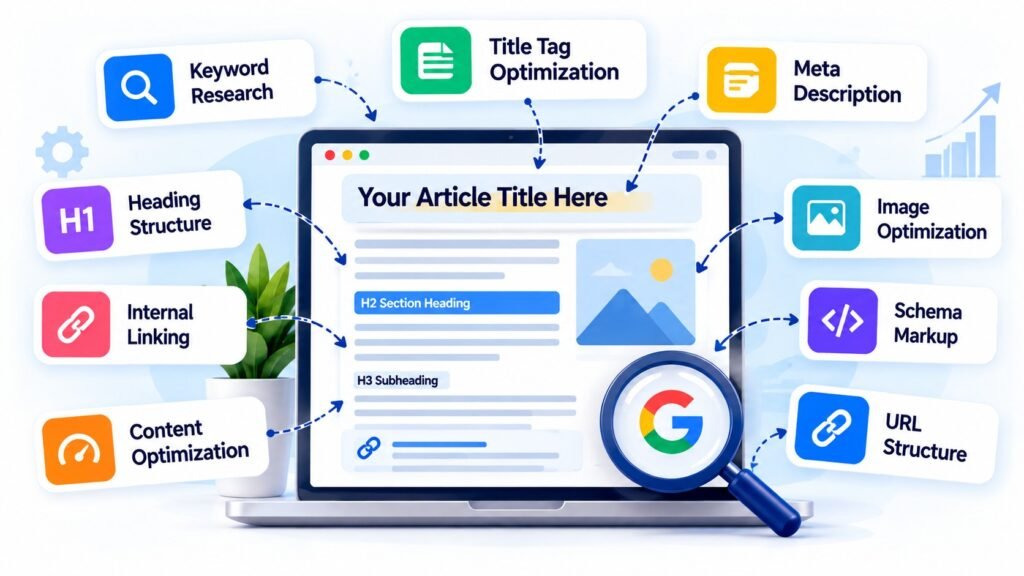
On-page SEO, also known as on-site SEO, is the process of optimizing individual web pages to improve their relevance, help search engines understand their content, and provide a better experience to visitors.
In simple terms, on-page SEO means making improvements to your website’s pages so that both search engines and users can understand them easily.
It involves optimizing different elements directly on your website, including:
- Keyword research and keyword placement
- Search intent optimization
- SEO title and title tag optimization
- Meta description optimization
- Heading structure (H1, H2, H3, etc.)
- Content quality and readability
- Internal linking
- Image optimization and alt text
- URL structure
- External linking
- Canonical tags
- Schema markup and structured data
- Mobile-friendly design
- Page performance and Core Web Vitals
- Content updates and freshness
For example, let’s say you own a digital marketing website and want to publish an article about on-page SEO.
Simply writing an article and adding the keyword “On-Page SEO” a few times isn’t enough.
You first need to understand what people are searching for, identify relevant keywords, analyze search intent, organize your content, optimize the title and headings, add useful internal links, and make sure the page provides genuinely helpful information.
All these activities are part of on-page SEO optimization.
One thing worth understanding is that on-page SEO isn’t about manipulating search engines. Its actual purpose is to improve your content and make it easier for search engines and users to understand what a particular page offers.
Why Is On-Page SEO Important?
Now that we understand what on-page SEO means, let’s look at why it matters.
Whenever someone searches for something on Google, Google tries to display the most relevant and useful pages for that particular search query.
It evaluates several signals to understand which pages are relevant to the user’s search.
If your website content isn’t properly organized, your page topic isn’t clear, or your content doesn’t address the user’s requirements, search engines may have difficulty understanding its relevance.
This is where on-page optimization becomes important.
Here are some major benefits of implementing a proper on-page SEO strategy.
1. Helps Search Engines Understand Your Content
Search engines need to understand what your page is about.
When you use descriptive title tags, meaningful headings, relevant content, and a logical page structure, you provide useful information about the topic and different sections of your page.
For example, if your article covers keyword research, title tag optimization, internal linking, and image SEO, properly organized headings help communicate these topics clearly.
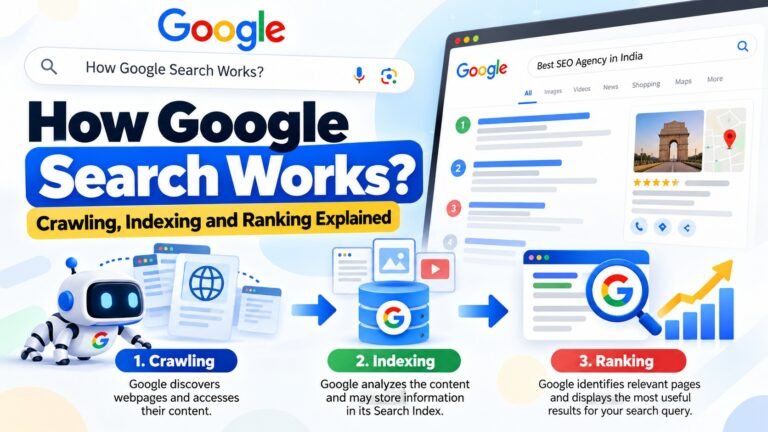
Related Post : How Google Search Works: Crawling, Indexing and Ranking Explained
2. Improves Search Visibility
Relevant and well-optimized content has a better opportunity to appear for appropriate search queries.
When your content matches the topic and satisfies the user’s requirements, it can improve your chances of gaining visibility in organic search results.
However, remember that on-page optimization alone doesn’t guarantee higher rankings. Technical SEO, content quality, competition, website authority, and other factors also influence organic search performance.
3. Improves User Experience
A properly optimized page makes it easier for visitors to find the information they need.
Imagine visiting a website where everything is placed in one long paragraph without headings, spacing, or internal navigation.
Even if the information is useful, reading it becomes difficult.
On the other hand, a properly structured page with descriptive headings, short paragraphs, relevant images, and useful links makes the reading experience much better.
4. Attracts Relevant Organic Traffic
Getting more traffic isn’t always the main objective of SEO.
What really matters is attracting visitors who are interested in your content, products, or services.
For example, if you provide SEO services, targeting relevant queries related to SEO agencies, SEO audits, and SEO services can help you reach people who may actually need your services.
That’s why keyword relevance and search intent should always be part of your on-page SEO strategy.
Keyword Research: The Foundation of On-Page SEO
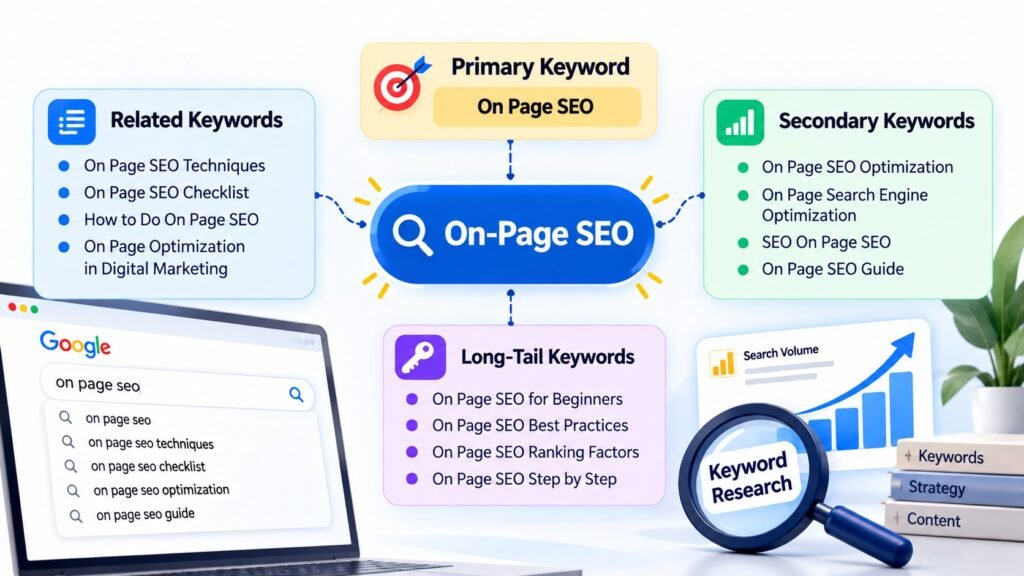
Before optimizing any website page, you need to understand what your target audience is searching for.
This is where keyword research comes in.
Keyword research is the process of identifying the search terms people use on search engines when looking for information, products, or services.
Let’s take an example.
Suppose you’re writing an article about on-page SEO.
Your primary keyword could be:
Primary Keyword: On Page SEO
But people may search for several related terms, such as:
- On Page SEO Optimization
- On Page Search Engine Optimization
- On Page SEO Techniques
- On Page SEO Checklist
- How to Do On Page SEO
- On Page Optimization in Digital Marketing
These keywords represent different ways users search for information about the same topic.
Understanding them helps you create content that covers the subject more comprehensively.
How to Perform Keyword Research
You can use several free and paid tools to discover relevant keyword opportunities.
1. Google Search
Google itself is one of the most useful starting points for keyword research.
Search for your primary keyword and examine:
- Google Autocomplete suggestions
- People Also Ask questions
- Related Searches
- Search result titles and descriptions
These features help you understand what users want to know about your topic.
For example, searching for “On Page SEO” may reveal questions about techniques, checklists, optimization processes, and important ranking factors.
You can use these questions to identify relevant sections for your article.
2. Google Keyword Planner
Google Keyword Planner is useful for discovering keyword ideas and understanding estimated search volume.
You can enter your primary keyword and explore related search terms.
It can help you identify additional keyword opportunities for your content strategy.
3. Ahrefs
Ahrefs is a popular SEO platform that offers several keyword research features.
You can use it to analyze:
- Keyword search volume
- Keyword difficulty
- Related keyword ideas
- Competitor rankings
- SERP analysis
- Organic keyword opportunities
It can also help you identify keywords that your competitors are already ranking for.
4. Semrush
Semrush offers features such as Keyword Overview, Keyword Magic Tool, and competitor analysis.
You can use these features to discover related keywords, analyze keyword difficulty, and identify opportunities to improve your content strategy.
5. Google Search Console
If your website is already indexed and receiving impressions, Google Search Console can be extremely useful.
Open the Performance report and check the Queries section.
Here, you can find the actual search queries for which your website is appearing in Google Search.
Sometimes, you’ll discover keywords that you never intentionally targeted but are still generating impressions.
These queries can help you identify new content opportunities and improve existing pages.
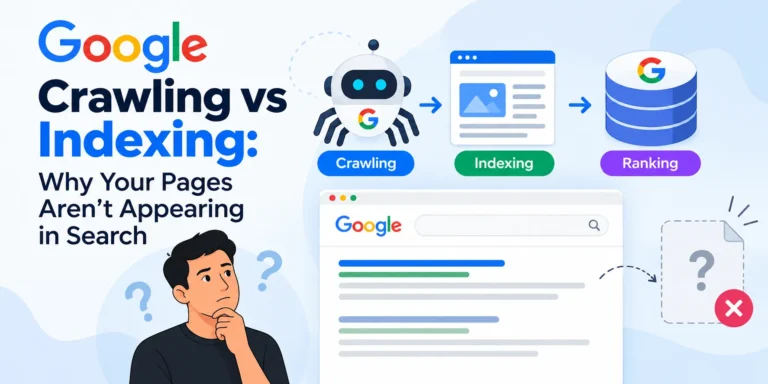
Related Post : Google Crawling vs Indexing: Why Your Pages Aren’t Appearing in Search
Primary Keywords, Secondary Keywords, and Related Topics
After collecting keyword ideas, organize them into different categories.
For example:
Primary Keyword:
- On Page SEO
Secondary Keywords:
- On Page SEO Optimization
- On Page Search Engine Optimization
- On Page SEO Techniques
- On Page Optimization in Digital Marketing
Related Topics:
- Keyword Research
- Search Intent
- Title Tag Optimization
- Meta Description
- Internal Linking
- Image SEO
- Schema Markup
- Content Optimization
Use these keywords naturally throughout your article.
You don’t need to repeat your primary keyword in every paragraph.
Google doesn’t rely only on exact keyword matching. It can also understand context, related concepts, and relationships between different topics.
The goal is to cover the subject properly rather than forcing keywords into every sentence.
Understand Search Intent Before Creating Content
After keyword research, the next important step is understanding search intent.
Search intent refers to the actual purpose behind a user’s search query.
In other words, what information or result does someone expect when they type a particular keyword into Google?
For example, consider these two searches:
- What is On-Page SEO?
- Best SEO Agency in Delhi
The first user wants information about on-page SEO.
The second user may be looking for an SEO agency to hire.
Both searches are related to SEO, but their intentions are completely different.
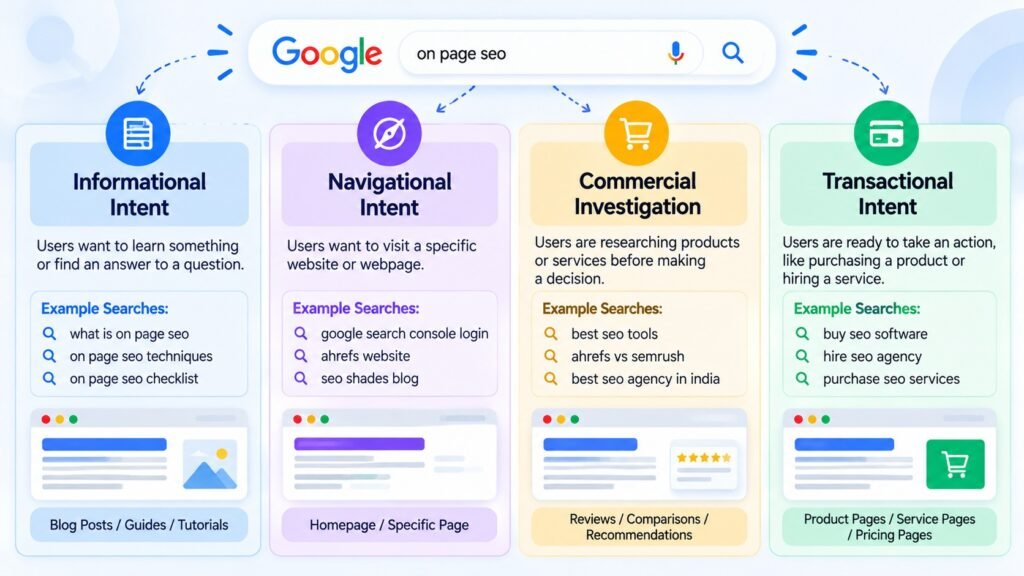
Generally, search intent can be divided into four categories.
1. Informational Intent
Users have informational intent when they want to learn something or find an answer to a question.
Examples:
- What is SEO?
- What is On-Page SEO?
- How Does Google Search Work?
- How to Optimize a Website?
For these queries, users generally expect guides, tutorials, explanations, and educational articles.
2. Navigational Intent
Navigational searches happen when users want to visit a particular website or webpage.
Examples:
- Google Search Console Login
- Ahrefs Website
- SEO Shades Blog
The user already knows which website they want to access.
3. Commercial Investigation
This intent applies when users are researching different products or services before making a decision.
Examples:
- Best SEO Tools
- Ahrefs vs Semrush
- Best SEO Agency in India
- Best WordPress SEO Plugins
Comparison articles, reviews, product pages, and detailed recommendations often satisfy this intent.
4. Transactional Intent
Transactional intent means the user is ready to take an action, such as purchasing a product or hiring a service.
Examples:
- Buy SEO Software
- Hire SEO Agency
- Purchase SEO Services
- Buy Keyword Research Tool
These searches often require service pages, product pages, pricing information, or clear conversion options.
How to Identify Search Intent
The easiest way to understand search intent is to search for your target keyword on Google and analyze the top-ranking results.
Look at the first 10 organic results and ask yourself:
- Are most results blog posts?
- Are they detailed guides?
- Are they product pages?
- Are they service pages?
- Are they comparison articles?
- What information do these pages cover?
For example, if Google is ranking detailed educational guides for a particular keyword, publishing a short service page probably won’t satisfy the same search intent.
You need to understand what users expect and create content accordingly.
Targeting a keyword is not enough. Your content must satisfy the reason behind that search.
Title Tag Optimization
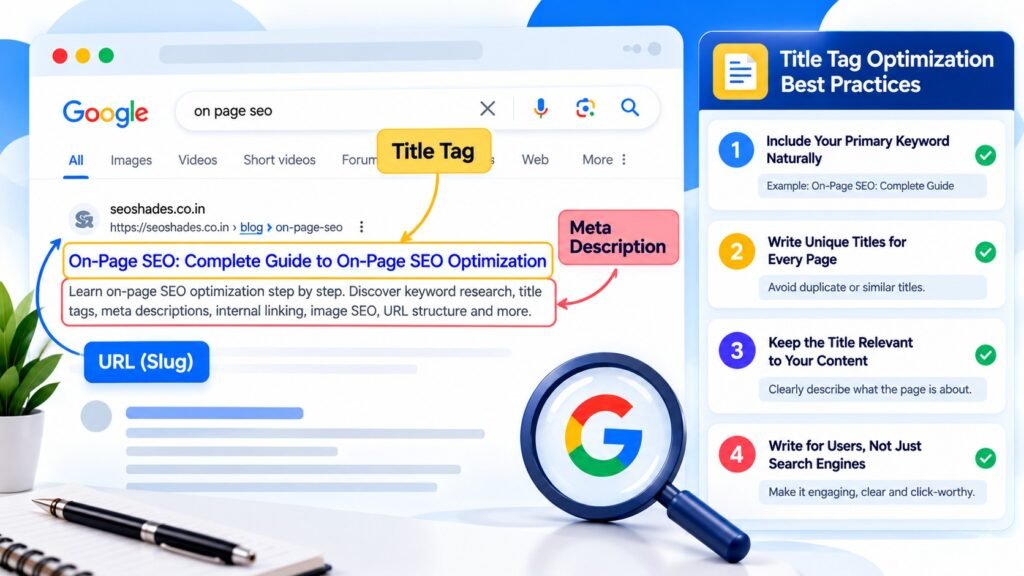
The title tag is one of the most important elements of on-page SEO.
A title tag is an HTML element that defines the title of a webpage.
It helps search engines understand the page topic and can serve as the source for the title link displayed in Google Search results.
For example, if your primary keyword is “On Page SEO,” you could write:
On-Page SEO: Complete Guide to Optimization
This title clearly communicates what users can expect from the page.
Best Practices for Title Tag Optimization
1. Include Your Primary Keyword Naturally
Try to include your primary keyword in the SEO title.
Where it makes sense, place it closer to the beginning.
For example:
On-Page SEO: Complete Guide to Optimization
This makes the topic immediately clear.
2. Write Unique Titles for Every Page
Avoid using the same title tag across multiple pages.
If your website has 100 blog posts, each post should have a title that accurately describes its individual topic.
Duplicate or overly similar titles can make it harder for users and search engines to distinguish between different pages.
3. Keep the Title Relevant to Your Content
Your title should accurately represent what the page actually covers.
If you’ve written a beginner-level article, don’t describe it as an advanced technical SEO guide.
Avoid misleading titles that promise information your content doesn’t provide.
4. Write for Users, Not Just Search Engines
Your title should be clear, descriptive, and relevant.
For example:
On-Page SEO Guide: Complete Optimization Tips | SEO Shades
This communicates the topic and identifies the website publishing the content.
One more thing: don’t treat a particular character count as a guaranteed ranking rule.
Google may display or rewrite title links depending on the search query, device, and other factors.
Your priority should be writing clear and relevant titles that accurately describe your pages.
Meta Description Optimization
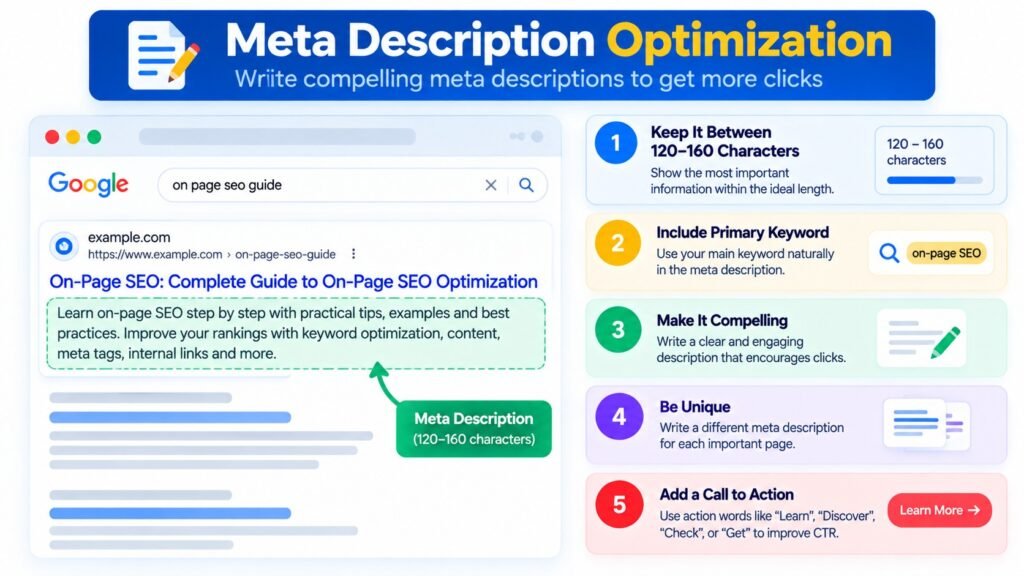
A meta description is an HTML element that provides a short summary of a webpage.
It often appears below the title link in Google Search results.
Although meta descriptions are not a direct Google ranking factor, they can influence whether users decide to click your result.
For example, if you’re publishing an article about on-page SEO, you could write:
“Learn on-page SEO optimization step by step. Discover keyword research, title tags, meta descriptions, internal linking, image SEO, and practical optimization techniques.”
This description tells users what they can expect to learn.
How to Write an Effective Meta Description
Follow these practices when writing meta descriptions:
- Summarize the actual content of the page.
- Include your primary keyword naturally.
- Explain what information users will find.
- Write a unique description for important pages.
- Avoid unnecessary keyword repetition.
- Make the description relevant to the search intent.
Don’t use meta descriptions simply as a place to insert keywords.
Think of them as a short introduction to your webpage.
Also, remember that Google doesn’t always display the exact meta description you provide. Depending on the search query, Google may generate a different snippet using content from your page.
URL Structure Optimization
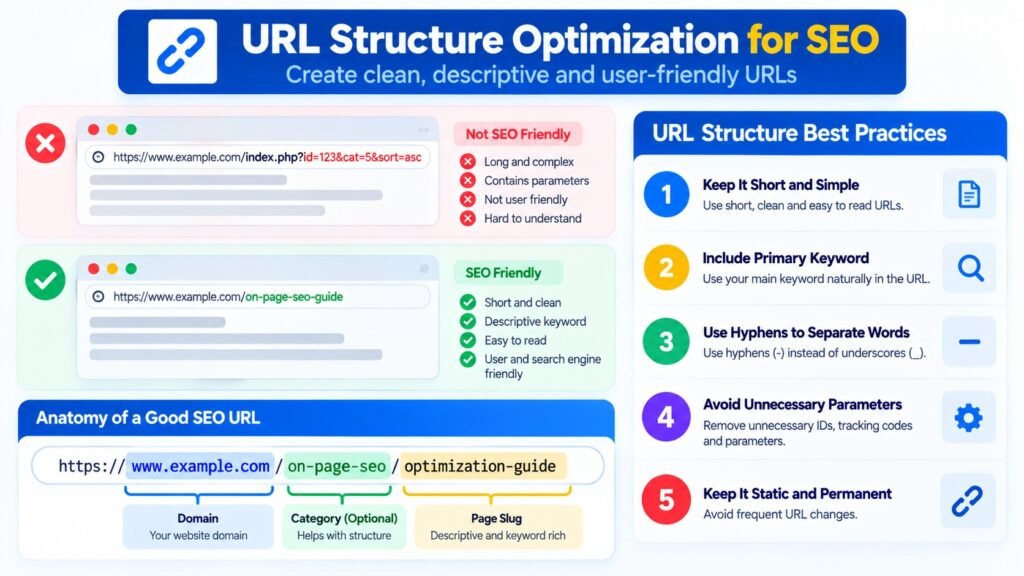
URL optimization is another important part of on-page SEO.
Your website URLs should be simple, readable, and descriptive.
Compare these examples.
Good URL:
seoshades.co.in/blog/on-page-seo/
Poor URL:
example.com/blog/post?id=12345
The first URL gives users a clear idea of the page topic.
A clean URL structure also helps maintain an organized website architecture.
URL Optimization Best Practices
- Keep URLs short and descriptive.
- Use hyphens to separate words.
- Avoid unnecessary numbers and special characters.
- Use relevant keywords where appropriate.
- Maintain a consistent URL structure across your website.
- Avoid changing published URLs without a proper reason.
- Implement relevant 301 redirects whenever you change an existing URL.
For example, if you change an existing blog URL, make sure the old URL redirects to the correct new URL.
This helps users and search engines reach the updated page.
Remember, simply adding a keyword to your URL doesn’t guarantee better rankings.
The main purpose of URL optimization is to create a clear and understandable website structure.
Heading Tag Optimization: H1, H2, H3, and H4
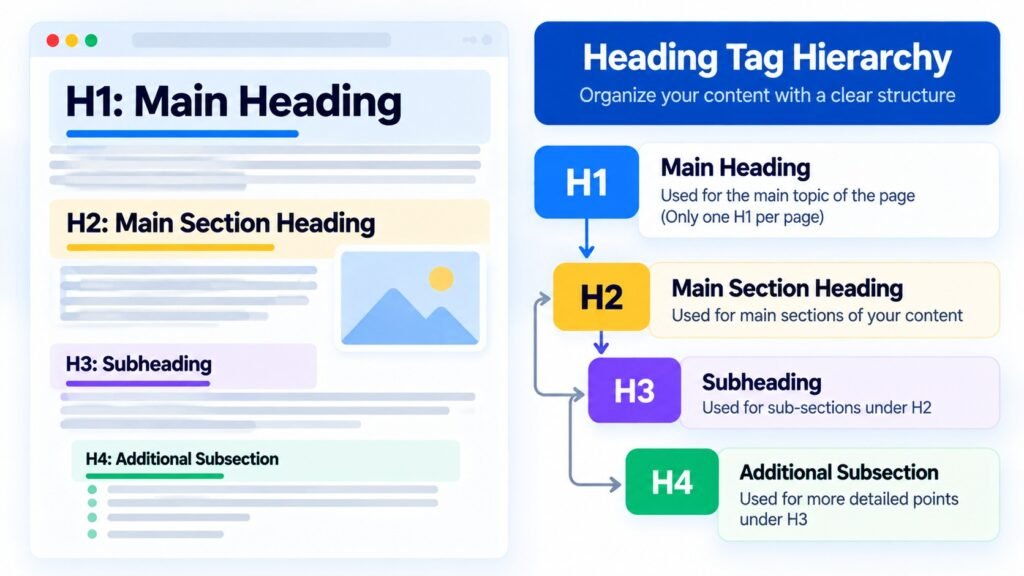
Heading tags help organize webpage content into meaningful sections.
They make articles easier to read and help users understand the relationship between different topics.
HTML provides six heading levels:
- H1
- H2
- H3
- H4
- H5
- H6
Let’s understand how to use them.
H1: The Main Heading
The H1 heading represents the main topic of your page.
Example:
H1: Complete Guide to On-Page SEO
It communicates the primary subject of the article.
H2: Main Content Sections
H2 headings are used to divide your article into major sections.
Examples:
- H2: What Is On-Page SEO?
- H2: Why Is On-Page SEO Important?
- H2: How to Optimize Title Tags
- H2: Image Optimization Techniques
These headings make it easier for readers to navigate the article.
H3: Subheadings
H3 headings are useful when you need to explain specific topics within an H2 section.
For example:
H2: Keyword Research for On-Page SEO
H3: Finding Primary Keywords
H3: Identifying Secondary Keywords
H3: Understanding Search Intent
H4: Additional Subsections
You can use H4 headings when a particular H3 section needs further organization.
However, you don’t need to use every heading level in every article.
The important thing is maintaining a logical heading hierarchy.
Don’t create unnecessary headings simply to insert more keywords.
Every heading should have a clear purpose and help readers understand the content.
Related Post : How to Fix Discovered – Currently Not Indexed in Google Search Console
Keyword Placement and Content Optimization
Now let’s discuss one of the most important parts of on-page SEO: content optimization.
You may have written a good title, optimized the meta description, and organized your headings properly.
But what if the actual content doesn’t answer the user’s question?
In that situation, optimizing metadata alone won’t be enough.
Content optimization means improving your content’s relevance, usefulness, accuracy, originality, and readability.
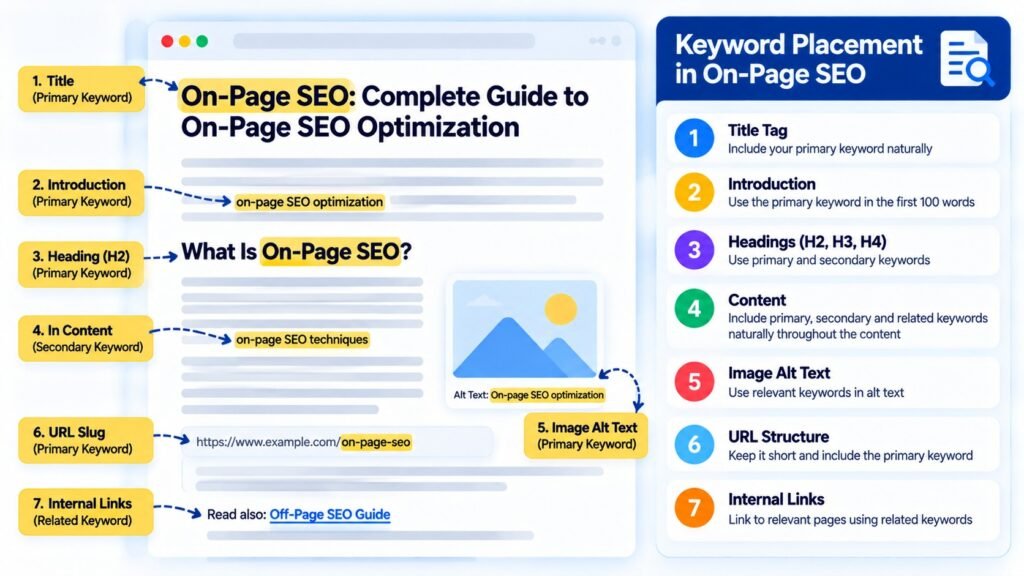
Where Should You Place Your Primary Keyword?
You can naturally include your primary keyword in relevant areas such as:
- SEO title
- H1 heading
- Introduction
- Relevant H2 headings
- Main body content
- URL, where appropriate
- Image alt text, when relevant to the image
However, this doesn’t mean you must include the exact keyword everywhere.
For example, if your primary keyword is “On-Page SEO,” repeating it in every paragraph will make your content unnatural.
Use variations and related phrases where they make sense.
Use Related Keywords and Entities
Suppose you’re writing an article about on-page SEO.
Instead of discussing only the main keyword, cover the important concepts associated with the topic.
For example:
- Keyword Research
- Search Intent
- Title Tags
- Meta Descriptions
- Internal Linking
- Anchor Text
- Image Alt Text
- Schema Markup
- Content Quality
- User Experience
- Canonical Tags
- Core Web Vitals
These topics help you explain the subject more comprehensively.
They also give your article better topical coverage.
However, don’t blindly add every keyword suggested by an SEO tool.
Only include terms that are genuinely relevant to the page.
Avoid Keyword Stuffing
Keyword stuffing means using the same keyword excessively in an attempt to manipulate search engine rankings.
For example:
“On-Page SEO is very important. If you want to do On-Page SEO, you should use On-Page SEO Optimization and different On-Page SEO Techniques.”
This type of writing sounds unnatural and provides a poor reading experience.
Instead, write naturally and use relevant keyword variations wherever they fit.
Focus on Content Depth and Originality
Many people believe that publishing a 3,000-word or 5,000-word article automatically improves rankings.
But there is no universal word count that guarantees a first-page position on Google.
Sometimes, a well-written 1,500-word article can be much more useful than a 5,000-word article filled with unnecessary information.
Your focus should be on content quality rather than word count.
Before publishing, ask yourself:
- Have I answered the user’s main question?
- Have I explained the important concepts?
- Have I included practical examples?
- Have I addressed common user questions?
- Does my article provide additional value compared with other available resources?
- Is the information accurate and up to date?
The goal isn’t to publish the longest article.
The goal is to publish the most useful content for your target audience.
Internal Linking Optimization
Internal linking is one of the most useful activities in on-page SEO.
An internal link connects one page of your website to another page on the same website.
For example, if you’re publishing an article about on-page SEO, you can link to other relevant articles covering:
- Technical SEO
- Keyword Research
- Off-Page SEO
- Link Building
- SEO Audit
- Content Marketing
This allows visitors to discover additional information without leaving your website.
Internal links also help search engines discover pages and understand the relationships between different sections of your website.
How to Implement Internal Linking Properly
Start by identifying relevant pages on your website.
Next, read your existing content and find places where linking to another article would genuinely help readers.
Use descriptive anchor text instead of generic phrases.
For example:
Less descriptive:
“Click here to learn more.”
More descriptive:
“Learn how to perform a Technical SEO Audit.”
The second example tells readers what they can expect after clicking the link.
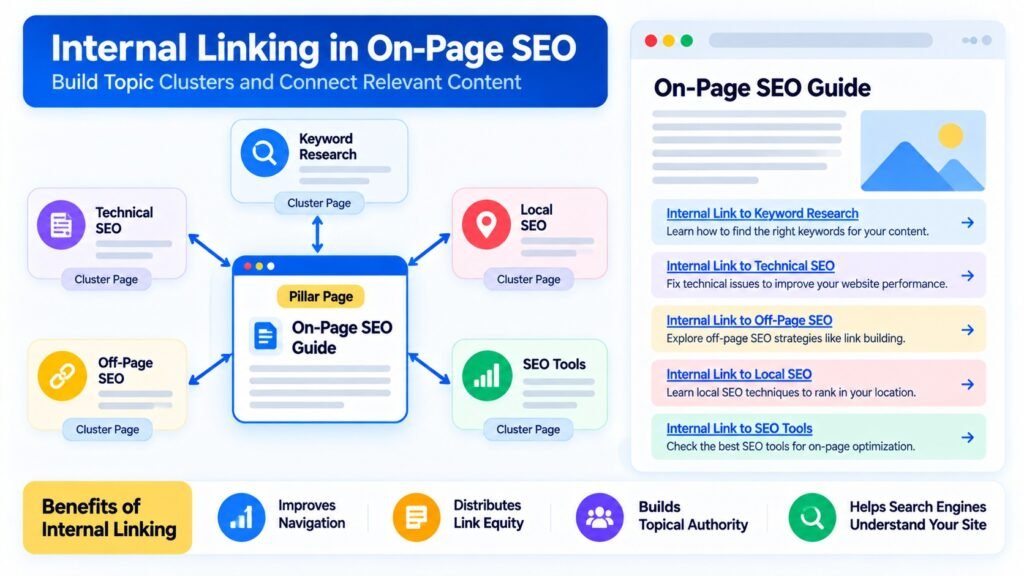
Build Topic Clusters Through Internal Links
Let’s say your website publishes educational content about SEO.
You can create a main guide:
Main Topic: Search Engine Optimization Guide
Then publish supporting articles:
- On-Page SEO
- Off-Page SEO
- Technical SEO
- Local SEO
- Keyword Research
- Link Building
Connect these articles through relevant internal links.
This creates a logical content structure and helps users explore related topics.
It also supports your topical authority strategy by connecting related content across your website.
However, don’t add internal links just to increase their number.
Every internal link should be relevant and useful to the reader.
Image Optimization for SEO
Images make your content more engaging and help explain complex information.
However, poorly optimized images can negatively affect website performance.
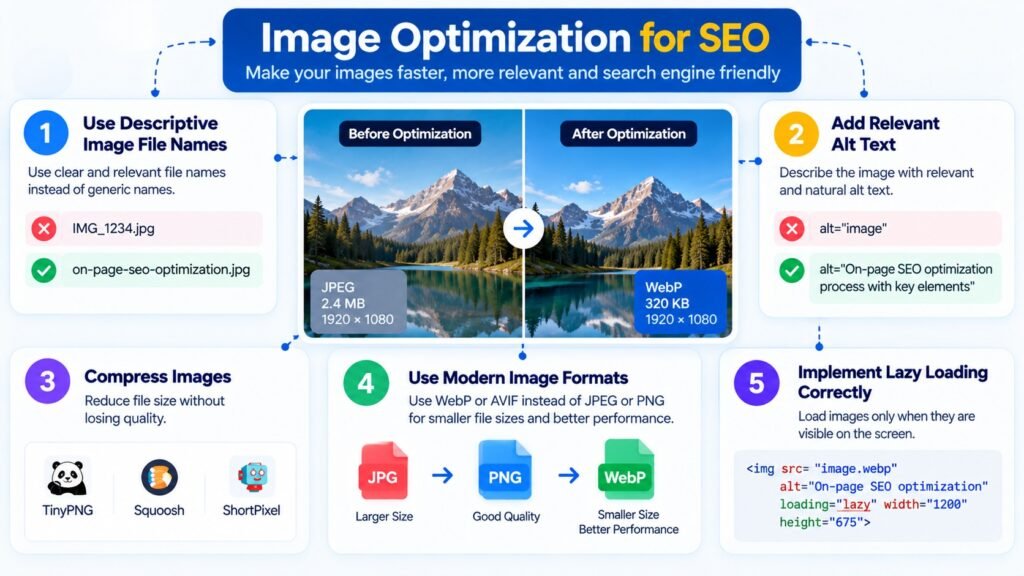
Image optimization involves several elements, including file names, alt text, compression, image formats, and loading behavior.
1. Use Descriptive Image File Names
Before uploading an image, give it a meaningful file name.
Poor file name:
IMG_20261031_123456.jpg
Better file name:
on-page-seo-optimization-checklist.jpg
A descriptive file name provides more context about the image.
2. Add Relevant Alt Text
Alt text describes the content of an image.
It helps screen readers communicate visual information to users and provides search engines with additional context.
For example:
“On-page SEO checklist showing title tags, meta descriptions, headings, and internal linking.”
Your alt text should accurately describe the image.
Don’t force your primary keyword into every image’s alt text.
If an image is purely decorative, an empty alt attribute may be appropriate.
Related Post : How to Optimize Content for Google AI Overviews in 2026
3. Compress Images
Large image files can increase page loading times.
Compressing images helps reduce their file size while maintaining acceptable visual quality.
Some useful image compression tools include:
- TinyPNG
- Squoosh
- ShortPixel
- Imagify
Choose an appropriate compression level depending on the image and its purpose.
4. Use Modern Image Formats
Where supported, consider using modern image formats such as:
- WebP
- AVIF
These formats can provide smaller file sizes while maintaining good image quality.
Smaller images can help improve website performance.
5. Implement Lazy Loading Correctly
Lazy loading delays the loading of images until they approach the user’s viewport.
This can reduce the amount of content that needs to load immediately when someone visits a page.
However, don’t blindly apply lazy loading to every image.
Your main hero image or Largest Contentful Paint image should generally be loaded promptly rather than unnecessarily delayed.
Content Readability and Formatting
Content readability is another important consideration when implementing on-page SEO.
Imagine someone visits your website and finds an article containing 15 to 20 lines in a single paragraph.
There are no headings, bullet points, spacing, or visual elements.
Even if you’ve included valuable information, the visitor may struggle to read it.
This is why content formatting matters.
Best Practices for Better Content Readability
- Keep paragraphs short and meaningful.
- Divide content into properly structured headings.
- Use bullet points wherever they improve clarity.
- Highlight important information appropriately.
- Add relevant images, illustrations, and screenshots.
- Use tables when comparing multiple items.
- Check how your content appears on mobile devices.
- Avoid unnecessary formatting that distracts readers.
Good formatting helps visitors scan your content and quickly find the information they need.
One thing I always recommend is to avoid focusing entirely on the green SEO score provided by WordPress plugins.
Your content should be easy to understand for actual readers, not just optimized to satisfy an SEO plugin.
External Linking Optimization
External links are links that take users from your website to another website.
For example, if you’re writing an article about Google Search, you might link to official Google Search Central documentation.
This gives readers access to additional information from a relevant and trustworthy source.
External linking can be useful when you need to support an explanation, reference official documentation, or provide additional resources.
External Linking Best Practices
- Link to relevant websites.
- Prefer official documentation where appropriate.
- Use descriptive anchor text.
- Check for broken external links.
- Avoid linking to unreliable or misleading resources.
- Don’t add links just to increase the number of outbound links.
You don’t need to add 10 or 20 external links to every article.
Add an external link when it genuinely improves the information you’re providing.
Canonical Tag Optimization
Canonical tags are an important technical element of on-page SEO.
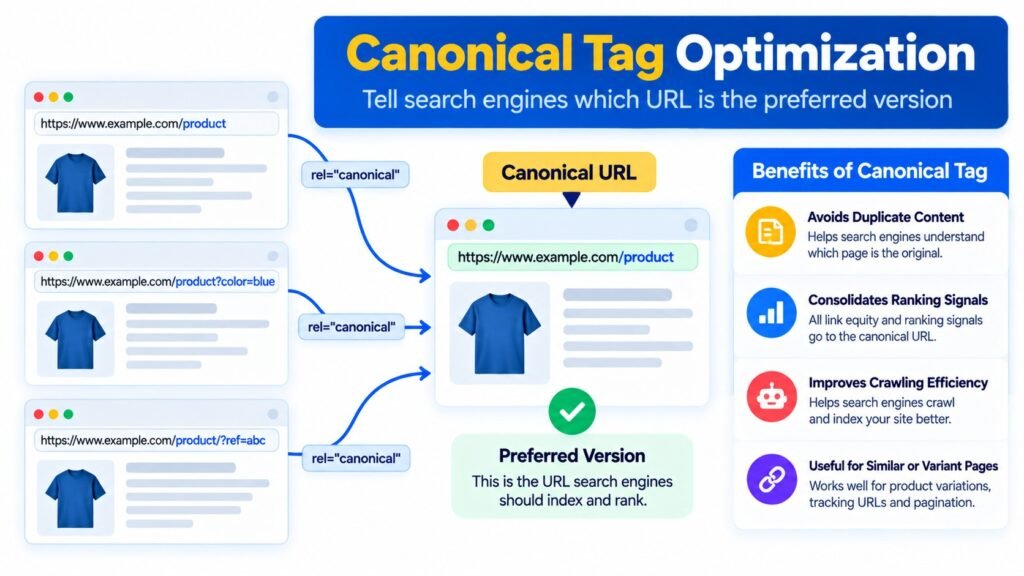
A canonical tag is an HTML element that helps search engines identify the preferred URL when multiple URLs contain duplicate or substantially similar content.
Let’s understand this with an example.
Suppose your website has a product page that can be accessed through different URLs:
https://example.com/product
https://example.com/product/?utm_source=facebook
https://example.com/product/?color=blue
Depending on your website configuration, these URLs may display identical or very similar content.
You may want search engines to treat the main product URL as the preferred version.
In this situation, you can implement a canonical tag.
Example of a canonical tag:
<link rel="canonical" href="https://example.com/product/" />This indicates your preferred canonical URL.
Canonical Tag Best Practices
- Use the correct preferred URL.
- Make sure the canonical URL is accessible.
- Avoid conflicting canonical signals.
- Don’t canonicalize substantially different pages to one URL without a valid reason.
- Review canonical implementation during technical SEO audits.
- Make sure internal links and XML sitemaps are consistent with your preferred URLs.
One important point: a canonical tag is a signal, not an absolute command.
Google can choose a different canonical URL based on its own assessment of the available signals.
Structured Data and Schema Markup
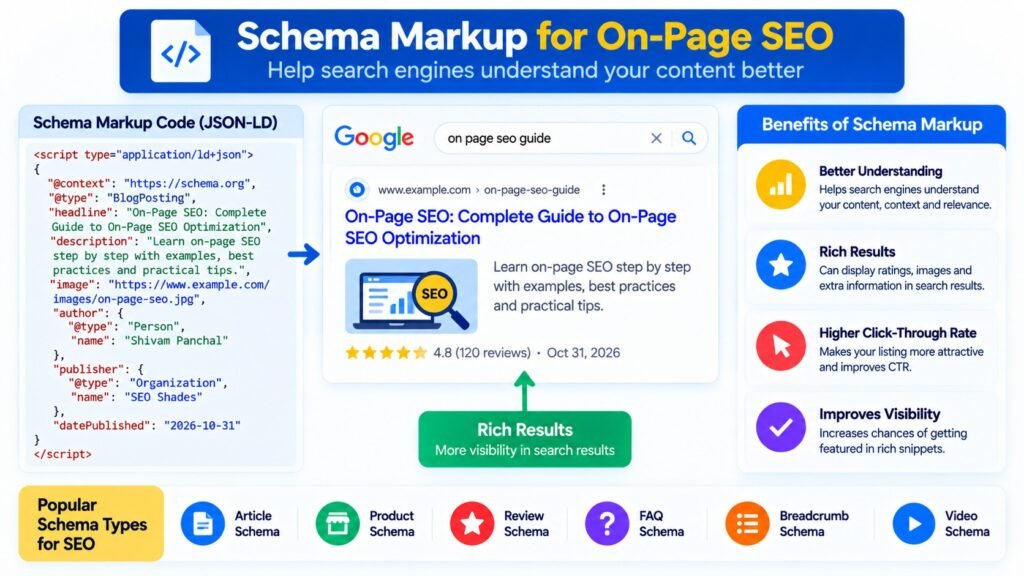
Structured data helps search engines understand the information available on your webpages in a more organized format.
Schema.org provides a vocabulary that website owners can use to describe different types of content.
For example, you can implement schema markup for:
- Article
- Product
- Organization
- Breadcrumb
- LocalBusiness
- VideoObject
Let’s say you’ve published a blog article on your website.
You can use Article structured data to provide details such as:
- Headline
- Author
- Publication date
- Modified date
- Featured image
Similarly, an e-commerce product page can use Product structured data to describe information such as product name, price, and availability.
How to Implement Schema Markup
JSON-LD is a popular format for implementing structured data.
You can add the relevant JSON-LD code to your webpage to describe its content.
After implementation, validate your structured data using:
- Google Rich Results Test
- Schema Markup Validator
These tools help identify structured data errors and check whether your markup is valid.
However, adding schema markup doesn’t automatically improve your rankings or guarantee rich results.
Your structured data must accurately represent the visible content of the page and follow Google’s guidelines.
Mobile-Friendly Page Optimization
A large number of people access websites through mobile devices.
That’s why providing a good mobile experience is essential.
Sometimes, a website looks perfect on desktop but creates problems on mobile.
Text may appear too small, images may not fit properly, navigation may become difficult, and buttons may be hard to access.
These issues can negatively affect the visitor’s experience.
Mobile Optimization Checklist
Check the following elements:
- Responsive website design
- Readable font sizes
- Proper spacing
- Mobile-friendly navigation
- Correct image sizing
- Accessible buttons
- Properly working menus
- No unnecessary horizontal scrolling
- Consistent important content across desktop and mobile
Another important point is Google’s mobile-first indexing.
Google primarily uses the mobile version of website content for indexing and ranking.
Therefore, make sure important content, metadata, and structured data are available on your mobile website as well.
Don’t create a mobile version that hides important information available on desktop.
Page Speed and Core Web Vitals
Website performance is another important part of on-page optimization.
If your website takes too long to load, visitors may become frustrated and leave before accessing your content.
You can analyze your website’s performance using Google PageSpeed Insights.
It provides performance information and recommendations to help you identify areas that need improvement.
Let’s understand the three Core Web Vitals metrics.
1. Largest Contentful Paint (LCP)
LCP measures how quickly the largest visible content element loads within the viewport.
This could be a large image, a video poster, or a significant text block.
Google’s recommended good LCP threshold is:
2.5 seconds or less.
2. Interaction to Next Paint (INP)
INP measures how quickly a webpage responds visually to user interactions.
For example, when someone clicks a button or interacts with a page element, the website should respond without unnecessary delay.
Google’s recommended good INP threshold is:
200 milliseconds or less.
3. Cumulative Layout Shift (CLS)
CLS measures unexpected layout movements that occur while a webpage is loading.
For example, imagine you’re about to click a button, but an image loads above it and pushes the button downward.
This creates a poor user experience.
Google’s recommended good CLS threshold is:
0.1 or less.
These metrics are evaluated at the 75th percentile of page visits, separately for mobile and desktop experiences.
How to Improve Page Speed
You can work on the following activities:
- Compress large images.
- Reduce unnecessary JavaScript.
- Remove unused plugins and scripts.
- Enable browser caching.
- Use reliable web hosting.
- Implement lazy loading appropriately.
- Optimize render-blocking resources.
- Use a CDN where required.
- Optimize font loading.
- Reduce unnecessary third-party scripts.
If you’re using WordPress, plugins such as LiteSpeed Cache can help with performance optimization.
However, don’t install multiple caching plugins without understanding their configurations.
Different caching plugins may create configuration conflicts and cause unexpected website issues.
Content Freshness and Regular Content Updates
Publishing an article doesn’t mean your SEO work is finished.
Information changes over time.
SEO tools introduce new features, Google updates its documentation, pricing changes, and new practices emerge within the industry.
This is why reviewing and updating existing content should be part of your regular SEO workflow.
For example, suppose you published an article about the best SEO tools two years ago.
Some tools may have changed their pricing, introduced new features, discontinued services, or changed their availability.
If you continue showing outdated information, visitors may not find your article useful.
You should review and update the content wherever necessary.
What Should You Check When Updating Existing Content?
- Outdated statistics
- Broken links
- Incorrect information
- Missing sections
- Old screenshots
- Outdated examples
- Changes in search intent
- Newly relevant questions
- Changes in product features or pricing
- Outdated recommendations
You can also review Google Search Console to identify pages that have lost impressions or clicks.
This may help you discover opportunities to improve existing content.
One thing to remember: don’t change the publication date simply to make an article look fresh.
Update the content when you’ve made meaningful improvements.
Best On-Page SEO Tools
Now let’s look at some useful tools that can help you with on-page SEO optimization.
You don’t necessarily need every paid SEO tool to optimize a website.
Some free tools provide valuable information, especially when you’re starting out.
1. Google Search Console
Google Search Console is a free tool that helps you monitor your website’s performance in Google Search.
It provides several useful reports, including:
- Search queries
- Impressions
- Clicks
- Average position
- Indexing information
- URL Inspection
- Core Web Vitals
You can use Search Console to understand which pages are receiving organic visibility and which queries are bringing users to your website.
It’s particularly useful for identifying optimization opportunities in existing content.
2. Google Analytics 4
Google Analytics 4 helps you analyze website traffic and user interactions.
You can use it to understand:
- Website traffic
- Landing page performance
- Traffic acquisition
- User interactions
- Conversions
- Engagement metrics
For SEO professionals, GA4 provides useful insights into how visitors interact with organic landing pages.
3. Ahrefs
Ahrefs offers several SEO features, including:
- Keyword research
- Competitor analysis
- Content research
- Site Audit
- Backlink analysis
- Organic keyword tracking
You can use it to identify keyword opportunities and understand how competing websites are performing.
4. Semrush
Semrush is another popular SEO platform.
Its features include:
- Keyword Overview
- Keyword Magic Tool
- Competitor Analysis
- Site Audit
- Position Tracking
- On-Page SEO recommendations
It can help you identify optimization opportunities and analyze your website against competitors.
5. Screaming Frog SEO Spider
Screaming Frog is a website crawling tool that can help identify different on-page and technical SEO issues.
You can use it to find:
- Missing title tags
- Duplicate title tags
- Missing meta descriptions
- Broken links
- Redirect issues
- Canonical tag issues
- Heading issues
- Image optimization opportunities
It’s particularly useful when auditing websites with hundreds or thousands of URLs.
6. Google PageSpeed Insights
Google PageSpeed Insights helps you analyze website performance.
You can use it to identify performance issues and receive recommendations for improving page loading and Core Web Vitals.
7. Rank Math and Yoast SEO
If you’re using WordPress, Rank Math and Yoast SEO are useful plugins for managing different SEO settings.
Depending on your configuration, these plugins can help you manage:
- SEO titles
- Meta descriptions
- Canonical tags
- XML sitemaps
- Robots meta settings
- Schema markup
They also provide content analysis and optimization suggestions.
However, remember that SEO tools provide data and recommendations. They cannot make every SEO decision for you.
A page doesn’t automatically become good enough to rank on Google simply because Rank Math or Yoast displays a 100/100 SEO score.
You still need to evaluate content quality, relevance, search intent, and user experience.
Common On-Page SEO Mistakes to Avoid
Even experienced SEO professionals can make mistakes while optimizing website pages.
Here are some common problems you should avoid.
Mistake 1: Keyword Stuffing
Repeating the same keyword unnecessarily is one of the most common content optimization mistakes.
It makes your writing unnatural and can violate Google’s spam policies.
Use relevant keywords naturally instead of forcing exact-match phrases into every paragraph.
Mistake 2: Duplicate Title Tags
Using identical title tags across multiple pages can make it difficult for users to understand how those pages differ.
Write unique, descriptive titles that accurately represent each page.
Mistake 3: Writing Only for Search Engines
Your content shouldn’t exist just to include keywords.
It should answer questions, explain concepts, and solve problems.
Always prioritize the information your audience needs.
Mistake 4: Ignoring Internal Linking
If your website contains hundreds of articles but very few relevant internal links, visitors may struggle to discover related content.
Build meaningful connections between relevant pages.
Mistake 5: Ignoring Mobile Experience
Always check how your website performs on mobile devices.
Make sure text, images, navigation, and buttons work properly across different screen sizes.
Mistake 6: Using Incorrect Alt Text
Adding your primary keyword to every image’s alt text isn’t proper image optimization.
Describe what the image actually shows.
Mistake 7: Ignoring Search Intent
Your page may target the correct keyword but still fail to satisfy what users expect.
Analyze the search results and create content that matches the intent behind the query.
Mistake 8: Depending Completely on SEO Plugin Scores
A green score in Rank Math or Yoast doesn’t guarantee first-page rankings.
Use SEO plugins as assistants, not as the final decision-makers.
Your actual optimization decisions should be based on content quality, search intent, technical accuracy, and user experience.
Related Post : How to Write Human-Written Content: A Complete Guide
Complete On-Page SEO Checklist
We’ve covered all the major elements of on-page SEO.
Now let’s put everything together into a practical checklist.
You can use this checklist when optimizing a new blog post, improving an existing webpage, or working on a client’s website.
Keyword and Content Research
- ☐ Identify the primary keyword.
- ☐ Find relevant secondary keywords.
- ☐ Analyze search intent.
- ☐ Study competing pages in Google Search.
- ☐ Identify common user questions.
- ☐ Understand the type of content users expect.
Title and Metadata Optimization
- ☐ Write a unique SEO title.
- ☐ Include the primary keyword naturally.
- ☐ Write a relevant meta description.
- ☐ Avoid duplicate metadata.
- ☐ Make sure the title accurately represents the content.
URL and Heading Optimization
- ☐ Create a descriptive URL.
- ☐ Use a clear H1 heading.
- ☐ Organize content using H2 and H3 headings.
- ☐ Maintain a logical heading hierarchy.
- ☐ Avoid unnecessary keyword repetition in headings.
Content Optimization
- ☐ Answer the user’s main question.
- ☐ Include relevant practical examples.
- ☐ Cover related topics naturally.
- ☐ Improve content readability.
- ☐ Remove unnecessary repetition.
- ☐ Provide original and useful information.
- ☐ Check factual accuracy.
- ☐ Make sure the content satisfies search intent.
Internal and External Linking
- ☐ Add relevant internal links.
- ☐ Use descriptive anchor text.
- ☐ Link to useful external resources.
- ☐ Check for broken links.
- ☐ Build meaningful connections between related articles.
Image Optimization
- ☐ Use relevant images.
- ☐ Compress large image files.
- ☐ Write descriptive alt text.
- ☐ Use modern image formats where appropriate.
- ☐ Optimize image loading.
- ☐ Avoid unnecessarily delaying the main hero image.
Technical Optimization
- ☐ Check canonical tags.
- ☐ Validate structured data.
- ☐ Check mobile usability.
- ☐ Analyze page performance.
- ☐ Check page indexability.
- ☐ Review important robots meta settings.
- ☐ Inspect the URL in Google Search Console.
After Publishing
- ☐ Check whether the page is indexed.
- ☐ Update the XML sitemap when necessary.
- ☐ Monitor organic impressions and clicks.
- ☐ Analyze relevant search queries.
- ☐ Review the page’s search performance.
- ☐ Improve content based on actual performance.
You can make this checklist part of your regular SEO workflow.
It will help you follow a consistent optimization process instead of making random changes to individual website pages.
Final Thoughts
We’ve covered what on-page SEO is, why it matters, and how to optimize individual website pages step by step.
One thing should be clear by now: on-page SEO is much more than optimizing title tags, meta descriptions, and keywords.
It’s a complete process that includes keyword research, search intent, content quality, internal linking, image optimization, website structure, structured data, and technical elements.
If you want to improve your website’s organic visibility, start by auditing your existing pages.
Don’t immediately start publishing more articles.
First, understand how your existing content is performing.
Identify:
- Which pages are already receiving organic traffic?
- Which pages are getting impressions but very few clicks?
- Which pages have ranking opportunities?
- Which articles need better content optimization?
- Which pages have missing or incorrect metadata?
- Which articles need stronger internal linking?
- Which pages have technical or performance issues?
You can use Google Search Console, Google Analytics 4, and other SEO tools to collect this information.
Once you’ve identified the problems, create a proper optimization strategy and start improving your pages.
And most importantly, always prioritize the user.
Create content that answers real questions, provides useful information, and solves actual problems.
That’s what a good on-page SEO strategy should focus on.
If you found this guide helpful, subscribe to the SEO Shades YouTube Channel for more practical tutorials on SEO, keyword research, technical SEO, link building, and digital marketing.
You can also visit SEO Shades to explore more SEO guides, tutorials, and resources.
Thank you for reading.
Keep learning, keep testing, and keep optimizing your website!
Related Post : 10 Technical SEO Myths Beginners Should Stop Believing
Frequently Asked Questions About On-Page SEO
1. What is On-Page SEO in digital marketing?
On-page SEO in digital marketing refers to optimizing individual website pages to improve their relevance, search visibility, and user experience. It includes keyword research, title tags, meta descriptions, content optimization, internal linking, image SEO, URL structure, and schema markup.
2. What are the most important On-Page SEO factors?
Some important on-page SEO elements include search intent, content quality, title tags, heading structure, internal linking, image optimization, URL structure, mobile usability, and structured data. Each element contributes to making your pages more useful and understandable.
3. How do I perform On-Page SEO optimization?
Start with keyword research and search intent analysis. Then optimize your SEO title, meta description, URL, headings, and content. Add relevant internal and external links, optimize images, check canonical tags and schema markup, and evaluate your page’s mobile experience and performance.
4. Which tools are best for On-Page SEO?
Some useful tools include Google Search Console, Google Analytics 4, Ahrefs, Semrush, Screaming Frog SEO Spider, Google PageSpeed Insights, Rank Math, and Yoast SEO. These tools help identify optimization opportunities and monitor website performance.
5. Does On-Page SEO guarantee first-page Google rankings?
No. On-page SEO does not guarantee first-page rankings. Search performance depends on several factors, including content relevance, competition, technical SEO, website authority, and overall usefulness. However, a properly optimized page has a better foundation for organic search visibility.
6. What is the difference between On-Page SEO and Off-Page SEO?
On-page SEO focuses on optimizing elements within your website, such as content, title tags, headings, internal links, and images. Off-page SEO focuses on activities outside your website, such as earning backlinks, building brand mentions, and developing your website’s reputation.
7. How often should I update my On-Page SEO?
Review your important pages regularly and update them whenever information becomes outdated, search intent changes, or new information can improve the content. Focus on meaningful improvements rather than changing publication dates without making actual updates



Comments
No comments yet. Be the first to share your thoughts or ask a question.